


| Plan | vCPUs | Memory | Storage | Network Speed | Backup | Operating system | Monthly Price | Order |
|---|---|---|---|---|---|---|---|---|
| Windows Server 01 | vCPUs 1 vCPU Intel Platinum 8272CL | Memory 1 GB RAM DDR4 ECC | Storage 20 GB SSD NVMe Enterprise | Network Speed 10 Gbps | Backup 2 times/week | Operating system | 3.30 USD /month | |
| Windows Server 02 | vCPUs 1 vCPU Intel Platinum 8272CL | Memory 2 GB RAM DDR4 ECC | Storage 25 GB SSD NVMe Enterprise | Network Speed 10 Gbps | Backup 2 times/week | Operating system | 4.40 USD /month | |
| Windows Server 03 | vCPUs 2 vCPU Intel Platinum 8272CL | Memory 2 GB RAM DDR4 ECC | Storage 25 GB SSD NVMe Enterprise | Network Speed 10 Gbps | Backup 2 times/week | Operating system | 6.16 USD /month | |
| Windows Server 04 | vCPUs 2 vCPU Intel Platinum 8272CL | Memory 4 GB RAM DDR4 ECC | Storage 30 GB SSD NVMe Enterprise | Network Speed 10 Gbps | Backup 2 times/week | Operating system | 7.92 USD /month | |
| Windows Server 05 | vCPUs 3 vCPU Intel Platinum 8272CL | Memory 3 GB RAM DDR4 ECC | Storage 30 GB SSD NVMe Enterprise | Network Speed 10 Gbps | Backup 2 times/week | Operating system | 9.24 USD /month | |
| Windows Server 06 | vCPUs 3 vCPU Intel Platinum 8272CL | Memory 6 GB RAM DDR4 ECC | Storage 30 GB SSD NVMe Enterprise | Network Speed 10 Gbps | Backup 2 times/week | Operating system | 11.88 USD /month | |
| Windows Server 07 | vCPUs 4 vCPU Intel Platinum 8272CL | Memory 4 GB RAM DDR4 ECC | Storage 40 GB SSD NVMe Enterprise | Network Speed 10 Gbps | Backup 2 times/week | Operating system | 12.32 USD /month | |
| Windows Server 08 | vCPUs 4 vCPU Intel Platinum 8272CL | Memory 6 GB RAM DDR4 ECC | Storage 40 GB SSD NVMe Enterprise | Network Speed 10 Gbps | Backup 2 times/week | Operating system | 14.08 USD /month | |
| Windows Server 09 | vCPUs 4 vCPU Intel Platinum 8272CL | Memory 8 GB RAM DDR4 ECC | Storage 40 GB SSD NVMe Enterprise | Network Speed 10 Gbps | Backup 2 times/week | Operating system | 15.84 USD /month | |
| Windows Server 10 | vCPUs 6 vCPU Intel Platinum 8272CL | Memory 8 GB RAM DDR4 ECC | Storage 40 GB SSD NVMe Enterprise | Network Speed 10 Gbps | Backup 2 times/week | Operating system | 20.24 USD /month | |
| Windows Server 11 | vCPUs 6 vCPU Intel Platinum 8272CL | Memory 12 GB RAM DDR4 ECC | Storage 50 GB SSD NVMe Enterprise | Network Speed 10 Gbps | Backup 2 times/week | Operating system | 23.76 USD /month | |
| Windows Server 12 | vCPUs 8 vCPU Intel Platinum 8272CL | Memory 12 GB RAM DDR4 ECC | Storage 50 GB SSD NVMe Enterprise | Network Speed 10 Gbps | Backup 2 times/week | Operating system | 28.16 USD /month | |
| Windows Server 13 | vCPUs 8 vCPU Intel Platinum 8272CL | Memory 16 GB RAM DDR4 ECC | Storage 60 GB SSD NVMe Enterprise | Network Speed 10 Gbps | Backup 2 times/week | Operating system | 31.68 USD /month | |
| Windows Server 14 | vCPUs 8 vCPU Intel Platinum 8272CL | Memory 24 GB RAM DDR4 ECC | Storage 70 GB SSD NVMe Enterprise | Network Speed 10 Gbps | Backup 2 times/week | Operating system | 38.72 USD /month | |
| Windows Server 15 | vCPUs 10 vCPU Intel Platinum 8272CL | Memory 20 GB RAM DDR4 ECC | Storage 70 GB SSD NVMe Enterprise | Network Speed 10 Gbps | Backup 2 times/week | Operating system | 39.60 USD /month | |
| Windows Server 16 | vCPUs 12 vCPU Intel Platinum 8272CL | Memory 18 GB RAM DDR4 ECC | Storage 80 GB SSD NVMe Enterprise | Network Speed 10 Gbps | Backup 2 times/week | Operating system | 42.24 USD /month | |
| Windows Server 17 | vCPUs 16 vCPU Intel Platinum 8272CL | Memory 24 GB RAM DDR4 ECC | Storage 100 GB SSD NVMe Enterprise | Network Speed 10 Gbps | Backup 2 times/week | Operating system | 56.32 USD /month | |
| Windows Server 18 | vCPUs 16 vCPU Intel Platinum 8272CL | Memory 32 GB RAM DDR4 ECC | Storage 100 GB SSD NVMe Enterprise | Network Speed 10 Gbps | Backup 2 times/week | Operating system | 63.36 USD /month | |
| Windows Server 19 | vCPUs 20 vCPU Intel Platinum 8272CL | Memory 40 GB RAM DDR4 ECC | Storage 120 GB SSD NVMe Enterprise | Network Speed 10 Gbps | Backup 2 times/week | Operating system | 79.20 USD /month | |
| Windows Server 20 | vCPUs 24 vCPU Intel Platinum 8272CL | Memory 64 GB RAM DDR4 ECC | Storage 150 GB SSD NVMe Enterprise | Network Speed 10 Gbps | Backup 2 times/week | Operating system | 109.12 USD /month | |
| Windows Server 21 | vCPUs 32 vCPU Intel Platinum 8272CL | Memory 96 GB RAM DDR4 ECC | Storage 180 GB SSD NVMe Enterprise | Network Speed 10 Gbps | Backup 2 times/week | Operating system | 154.88 USD /month | |
| Windows Server 22 | vCPUs 48 vCPU Intel Platinum 8272CL | Memory 128 GB RAM DDR4 ECC | Storage 200 GB SSD NVMe Enterprise | Network Speed 10 Gbps | Backup 2 times/week | Operating system | 218.24 USD /month | |
| Windows Server 23 | vCPUs 64 vCPU Intel Platinum 8272CL | Memory 160 GB RAM DDR4 ECC | Storage 250 GB SSD NVMe Enterprise | Network Speed 10 Gbps | Backup 2 times/week | Operating system | 281.60 USD /month | |
| Windows Server 24 | vCPUs 96 vCPU Intel Platinum 8272CL | Memory 256 GB RAM DDR4 ECC | Storage 300 GB SSD NVMe Enterprise | Network Speed 10 Gbps | Backup 2 times/week | Operating system | 436.48 USD /month |
Vietnam VPS Windows Server
VPS Windows Server
Vietnam
VPS Windows Server at VPSTTT has a familiar administration interface, Remote Desktop and the ability to run the Microsoft ecosystem; suitable for .NET, IIS, SQL Server, accounting software, desktop applications and remote work environments.
- Pre-install Windows Server 2008, 2012, 2016, 2019, 2022 and 2025 right when installing VPS
- Choose all four lines: Intel Platinum, AMD EPYC, Ryzen 9 and Intel Gold
- NVMe Enterprise, 10Gbps network, periodic backup and 24/7 technical support
7-day money-back guarantee if you are not satisfied
Windows Server VPS Price List
Select the hardware tab to see the full configuration from package 01 to the last package. The package name is standardized according to Windows Server VPS and Windows Server pre-activated operating system selector.
| Plan | vCPUs | Memory | Storage | Network Speed | Backup | Operating system | Monthly Price | Order |
|---|---|---|---|---|---|---|---|---|
| Windows Server 01 | vCPUs 1 vCPU AMD EPYC 7J13 | Memory 1 GB RAM DDR4 ECC | Storage 20 GB SSD NVMe Enterprise | Network Speed 10 Gbps | Backup 2 times/week | Operating system | 3.30 USD /month | |
| Windows Server 02 | vCPUs 1 vCPU AMD EPYC 7J13 | Memory 2 GB RAM DDR4 ECC | Storage 25 GB SSD NVMe Enterprise | Network Speed 10 Gbps | Backup 2 times/week | Operating system | 4.40 USD /month | |
| Windows Server 03 | vCPUs 2 vCPU AMD EPYC 7J13 | Memory 2 GB RAM DDR4 ECC | Storage 25 GB SSD NVMe Enterprise | Network Speed 10 Gbps | Backup 2 times/week | Operating system | 6.16 USD /month | |
| Windows Server 04 | vCPUs 2 vCPU AMD EPYC 7J13 | Memory 4 GB RAM DDR4 ECC | Storage 30 GB SSD NVMe Enterprise | Network Speed 10 Gbps | Backup 2 times/week | Operating system | 7.92 USD /month | |
| Windows Server 05 | vCPUs 3 vCPU AMD EPYC 7J13 | Memory 3 GB RAM DDR4 ECC | Storage 30 GB SSD NVMe Enterprise | Network Speed 10 Gbps | Backup 2 times/week | Operating system | 9.24 USD /month | |
| Windows Server 06 | vCPUs 3 vCPU AMD EPYC 7J13 | Memory 6 GB RAM DDR4 ECC | Storage 30 GB SSD NVMe Enterprise | Network Speed 10 Gbps | Backup 2 times/week | Operating system | 11.88 USD /month | |
| Windows Server 07 | vCPUs 4 vCPU AMD EPYC 7J13 | Memory 4 GB RAM DDR4 ECC | Storage 40 GB SSD NVMe Enterprise | Network Speed 10 Gbps | Backup 2 times/week | Operating system | 12.32 USD /month | |
| Windows Server 08 | vCPUs 4 vCPU AMD EPYC 7J13 | Memory 6 GB RAM DDR4 ECC | Storage 40 GB SSD NVMe Enterprise | Network Speed 10 Gbps | Backup 2 times/week | Operating system | 14.08 USD /month | |
| Windows Server 09 | vCPUs 4 vCPU AMD EPYC 7J13 | Memory 8 GB RAM DDR4 ECC | Storage 40 GB SSD NVMe Enterprise | Network Speed 10 Gbps | Backup 2 times/week | Operating system | 15.84 USD /month | |
| Windows Server 10 | vCPUs 6 vCPU AMD EPYC 7J13 | Memory 8 GB RAM DDR4 ECC | Storage 40 GB SSD NVMe Enterprise | Network Speed 10 Gbps | Backup 2 times/week | Operating system | 20.24 USD /month | |
| Windows Server 11 | vCPUs 6 vCPU AMD EPYC 7J13 | Memory 12 GB RAM DDR4 ECC | Storage 50 GB SSD NVMe Enterprise | Network Speed 10 Gbps | Backup 2 times/week | Operating system | 23.76 USD /month | |
| Windows Server 12 | vCPUs 8 vCPU AMD EPYC 7J13 | Memory 12 GB RAM DDR4 ECC | Storage 50 GB SSD NVMe Enterprise | Network Speed 10 Gbps | Backup 2 times/week | Operating system | 28.16 USD /month | |
| Windows Server 13 | vCPUs 8 vCPU AMD EPYC 7J13 | Memory 16 GB RAM DDR4 ECC | Storage 60 GB SSD NVMe Enterprise | Network Speed 10 Gbps | Backup 2 times/week | Operating system | 31.68 USD /month | |
| Windows Server 14 | vCPUs 8 vCPU AMD EPYC 7J13 | Memory 24 GB RAM DDR4 ECC | Storage 70 GB SSD NVMe Enterprise | Network Speed 10 Gbps | Backup 2 times/week | Operating system | 38.72 USD /month | |
| Windows Server 15 | vCPUs 10 vCPU AMD EPYC 7J13 | Memory 20 GB RAM DDR4 ECC | Storage 70 GB SSD NVMe Enterprise | Network Speed 10 Gbps | Backup 2 times/week | Operating system | 39.60 USD /month | |
| Windows Server 16 | vCPUs 12 vCPU AMD EPYC 7J13 | Memory 18 GB RAM DDR4 ECC | Storage 80 GB SSD NVMe Enterprise | Network Speed 10 Gbps | Backup 2 times/week | Operating system | 42.24 USD /month | |
| Windows Server 17 | vCPUs 16 vCPU AMD EPYC 7J13 | Memory 24 GB RAM DDR4 ECC | Storage 100 GB SSD NVMe Enterprise | Network Speed 10 Gbps | Backup 2 times/week | Operating system | 56.32 USD /month | |
| Windows Server 18 | vCPUs 16 vCPU AMD EPYC 7J13 | Memory 32 GB RAM DDR4 ECC | Storage 100 GB SSD NVMe Enterprise | Network Speed 10 Gbps | Backup 2 times/week | Operating system | 63.36 USD /month | |
| Windows Server 19 | vCPUs 20 vCPU AMD EPYC 7J13 | Memory 40 GB RAM DDR4 ECC | Storage 120 GB SSD NVMe Enterprise | Network Speed 10 Gbps | Backup 2 times/week | Operating system | 79.20 USD /month | |
| Windows Server 20 | vCPUs 24 vCPU AMD EPYC 7J13 | Memory 64 GB RAM DDR4 ECC | Storage 150 GB SSD NVMe Enterprise | Network Speed 10 Gbps | Backup 2 times/week | Operating system | 109.12 USD /month | |
| Windows Server 21 | vCPUs 32 vCPU AMD EPYC 7J13 | Memory 96 GB RAM DDR4 ECC | Storage 180 GB SSD NVMe Enterprise | Network Speed 10 Gbps | Backup 2 times/week | Operating system | 154.88 USD /month | |
| Windows Server 22 | vCPUs 48 vCPU AMD EPYC 7J13 | Memory 128 GB RAM DDR4 ECC | Storage 200 GB SSD NVMe Enterprise | Network Speed 10 Gbps | Backup 2 times/week | Operating system | 218.24 USD /month | |
| Windows Server 23 | vCPUs 64 vCPU AMD EPYC 7J13 | Memory 160 GB RAM DDR4 ECC | Storage 250 GB SSD NVMe Enterprise | Network Speed 10 Gbps | Backup 2 times/week | Operating system | 281.60 USD /month | |
| Windows Server 24 | vCPUs 96 vCPU AMD EPYC 7J13 | Memory 256 GB RAM DDR4 ECC | Storage 300 GB SSD NVMe Enterprise | Network Speed 10 Gbps | Backup 2 times/week | Operating system | 436.48 USD /month |
| Plan | vCPUs | Memory | Storage | Network Speed | Backup | Operating system | Monthly Price | Order |
|---|---|---|---|---|---|---|---|---|
| Windows Server 01 | vCPUs 2 vCPU AMD Ryzen 9 9950X | Memory 4 GB RAM DDR5 5600 MHz | Storage 40 GB SSD NVMe Enterprise | Network Speed 10 Gbps | Backup 2 times/week | Operating system | 16.64 USD /month | |
| Windows Server 02 | vCPUs 3 vCPU AMD Ryzen 9 9950X | Memory 6 GB RAM DDR5 5600 MHz | Storage 50 GB SSD NVMe Enterprise | Network Speed 10 Gbps | Backup 2 times/week | Operating system | 24.96 USD /month | |
| Windows Server 03 | vCPUs 4 vCPU AMD Ryzen 9 9950X | Memory 8 GB RAM DDR5 5600 MHz | Storage 60 GB SSD NVMe Enterprise | Network Speed 10 Gbps | Backup 2 times/week | Operating system | 33.28 USD /month | |
| Windows Server 04 | vCPUs 6 vCPU AMD Ryzen 9 9950X | Memory 12 GB RAM DDR5 5600 MHz | Storage 70 GB SSD NVMe Enterprise | Network Speed 10 Gbps | Backup 2 times/week | Operating system | 49.92 USD /month | |
| Windows Server 05 | vCPUs 8 vCPU AMD Ryzen 9 9950X | Memory 16 GB RAM DDR5 5600 MHz | Storage 80 GB SSD NVMe Enterprise | Network Speed 10 Gbps | Backup 2 times/week | Operating system | 66.56 USD /month | |
| Windows Server 06 | vCPUs 10 vCPU AMD Ryzen 9 9950X | Memory 24 GB RAM DDR5 5600 MHz | Storage 90 GB SSD NVMe Enterprise | Network Speed 10 Gbps | Backup 2 times/week | Operating system | 91.84 USD /month | |
| Windows Server 07 | vCPUs 12 vCPU AMD Ryzen 9 9950X | Memory 28 GB RAM DDR5 5600 MHz | Storage 100 GB SSD NVMe Enterprise | Network Speed 10 Gbps | Backup 2 times/week | Operating system | 108.48 USD /month | |
| Windows Server 08 | vCPUs 14 vCPU AMD Ryzen 9 9950X | Memory 32 GB RAM DDR5 5600 MHz | Storage 120 GB SSD NVMe Enterprise | Network Speed 10 Gbps | Backup 2 times/week | Operating system | 125.12 USD /month | |
| Windows Server 09 | vCPUs 16 vCPU AMD Ryzen 9 9950X | Memory 36 GB RAM DDR5 5600 MHz | Storage 140 GB SSD NVMe Enterprise | Network Speed 10 Gbps | Backup 2 times/week | Operating system | 141.76 USD /month | |
| Windows Server 10 | vCPUs 18 vCPU AMD Ryzen 9 9950X | Memory 48 GB RAM DDR5 5600 MHz | Storage 160 GB SSD NVMe Enterprise | Network Speed 10 Gbps | Backup 2 times/week | Operating system | 175.68 USD /month | |
| Windows Server 11 | vCPUs 20 vCPU AMD Ryzen 9 9950X | Memory 56 GB RAM DDR5 5600 MHz | Storage 180 GB SSD NVMe Enterprise | Network Speed 10 Gbps | Backup 2 times/week | Operating system | 200.96 USD /month | |
| Windows Server 12 | vCPUs 22 vCPU AMD Ryzen 9 9950X | Memory 72 GB RAM DDR5 5600 MHz | Storage 200 GB SSD NVMe Enterprise | Network Speed 10 Gbps | Backup 2 times/week | Operating system | 243.52 USD /month | |
| Windows Server 13 | vCPUs 24 vCPU AMD Ryzen 9 9950X | Memory 80 GB RAM DDR5 5600 MHz | Storage 220 GB SSD NVMe Enterprise | Network Speed 10 Gbps | Backup 2 times/week | Operating system | 268.80 USD /month | |
| Windows Server 14 | vCPUs 28 vCPU AMD Ryzen 9 9950X | Memory 96 GB RAM DDR5 5600 MHz | Storage 240 GB SSD NVMe Enterprise | Network Speed 10 Gbps | Backup 2 times/week | Operating system | 319.36 USD /month | |
| Windows Server 15 | vCPUs 32 vCPU AMD Ryzen 9 9950X | Memory 128 GB RAM DDR5 5600 MHz | Storage 300 GB SSD NVMe Enterprise | Network Speed 10 Gbps | Backup 2 times/week | Operating system | 404.48 USD /month |
| Plan | vCPUs | Memory | Storage | Network Speed | Backup | Operating system | Monthly Price | Order |
|---|---|---|---|---|---|---|---|---|
| Windows Server 01 | vCPUs 2 vCPU Intel Gold 6144 | Memory 4 GB RAM DDR4 ECC | Storage 50 GB SSD NVMe Enterprise | Network Speed 10 Gbps | Backup 2 times/week | Operating system | 9.12 USD /month | |
| Windows Server 02 | vCPUs 3 vCPU Intel Gold 6144 | Memory 6 GB RAM DDR4 ECC | Storage 60 GB SSD NVMe Enterprise | Network Speed 10 Gbps | Backup 2 times/week | Operating system | 13.68 USD /month | |
| Windows Server 03 | vCPUs 4 vCPU Intel Gold 6144 | Memory 8 GB RAM DDR4 ECC | Storage 70 GB SSD NVMe Enterprise | Network Speed 10 Gbps | Backup 2 times/week | Operating system | 18.24 USD /month | |
| Windows Server 04 | vCPUs 6 vCPU Intel Gold 6144 | Memory 12 GB RAM DDR4 ECC | Storage 80 GB SSD NVMe Enterprise | Network Speed 10 Gbps | Backup 2 times/week | Operating system | 27.36 USD /month | |
| Windows Server 05 | vCPUs 8 vCPU Intel Gold 6144 | Memory 16 GB RAM DDR4 ECC | Storage 90 GB SSD NVMe Enterprise | Network Speed 10 Gbps | Backup 2 times/week | Operating system | 36.48 USD /month | |
| Windows Server 06 | vCPUs 10 vCPU Intel Gold 6144 | Memory 24 GB RAM DDR4 ECC | Storage 100 GB SSD NVMe Enterprise | Network Speed 10 Gbps | Backup 2 times/week | Operating system | 49.12 USD /month | |
| Windows Server 07 | vCPUs 12 vCPU Intel Gold 6144 | Memory 28 GB RAM DDR4 ECC | Storage 120 GB SSD NVMe Enterprise | Network Speed 10 Gbps | Backup 2 times/week | Operating system | 58.24 USD /month | |
| Windows Server 08 | vCPUs 14 vCPU Intel Gold 6144 | Memory 32 GB RAM DDR4 ECC | Storage 140 GB SSD NVMe Enterprise | Network Speed 10 Gbps | Backup 2 times/week | Operating system | 67.36 USD /month | |
| Windows Server 09 | vCPUs 16 vCPU Intel Gold 6144 | Memory 36 GB RAM DDR4 ECC | Storage 160 GB SSD NVMe Enterprise | Network Speed 10 Gbps | Backup 2 times/week | Operating system | 76.48 USD /month | |
| Windows Server 10 | vCPUs 18 vCPU Intel Gold 6144 | Memory 48 GB RAM DDR4 ECC | Storage 200 GB SSD NVMe Enterprise | Network Speed 10 Gbps | Backup 2 times/week | Operating system | 92.64 USD /month | |
| Windows Server 11 | vCPUs 20 vCPU Intel Gold 6144 | Memory 56 GB RAM DDR4 ECC | Storage 250 GB SSD NVMe Enterprise | Network Speed 10 Gbps | Backup 2 times/week | Operating system | 105.28 USD /month | |
| Windows Server 12 | vCPUs 22 vCPU Intel Gold 6144 | Memory 72 GB RAM DDR4 ECC | Storage 300 GB SSD NVMe Enterprise | Network Speed 10 Gbps | Backup 2 times/week | Operating system | 124.96 USD /month | |
| Windows Server 13 | vCPUs 24 vCPU Intel Gold 6144 | Memory 80 GB RAM DDR4 ECC | Storage 350 GB SSD NVMe Enterprise | Network Speed 10 Gbps | Backup 2 times/week | Operating system | 137.60 USD /month | |
| Windows Server 14 | vCPUs 28 vCPU Intel Gold 6144 | Memory 96 GB RAM DDR4 ECC | Storage 400 GB SSD NVMe Enterprise | Network Speed 10 Gbps | Backup 2 times/week | Operating system | 162.88 USD /month | |
| Windows Server 15 | vCPUs 32 vCPU Intel Gold 6144 | Memory 128 GB RAM DDR4 ECC | Storage 500 GB SSD NVMe Enterprise | Network Speed 10 Gbps | Backup 2 times/week | Operating system | 202.24 USD /month |

Buy 1 more vCPU
$2.20

Buy an additional 1 GB DDR4 ECC RAM
$0.88

Buy an additional 10 GB NVMe SSD
$0.48

Buy 1 more IPv4
$1
Custom configuration
Build Your Own VPS, See The Price Instantly
Describe your workload for a suggestion, or set CPU, RAM and storage yourself to see the price instantly.
Server line
vCPU
1 vCPU+2.20 USD / vCPU add-on96 vCPU
GB
1 GB+0.88 USD / GB add-on256 GB
GB
20 GB+0.48 USD / 10 GB add-on300 GB
Extra IPv4+1 USD / IPv4
Highlights of VPS Windows Server
Windows Server 2012 R2 For Legacy Software
Suitable for accounting software, internal applications or legacy libraries tested on Windows Server 2012 R2. You should only deploy within control, tighten RDP and have a migration plan because the version has reached the end of its support lifecycle.
Order now Windows Server 2019 Balanced Compatibility
Mature choice for IIS, ASP.NET, Remote Desktop and SQL Server; Good compatibility with many business software but still has more modern security and management layers than the 2012 R2 generation.
Order now Windows Server 2022 For Modern Production
Suitable for websites, APIs, and enterprise systems that require TLS 1.3, multi-layered protection, and a longer support lifecycle. This is a balanced choice for most new Windows production workloads.
Order now Windows Server 2025 For Long-Term Roadmap
Prioritize the new Windows Server platform, improving security, scalability, and hybrid governance. You should check the license, driver and compatibility level of the specific application before moving to production.
Order nowWhat is VPS Windows Server?
VPS Windows Server is a virtual server configured to quickly deploy Windows Server 2008, 2012, 2016, 2019, 2022 and 2025. Customers receive their own CPU, RAM, hard drive and IP resources, and have administrative rights to install websites, applications or services as needed.
The strengths of Windows Server are the familiar administration interface, Remote Desktop and the ability to run the Microsoft ecosystem. So the service is suitable for .NET, IIS, SQL Server, accounting software, desktop applications and remote work environments.
At VPSTTT, customers can choose four hardware lines instead of being limited to one configuration: balanced Intel Platinum, multi-core AMD EPYC, high-clock Ryzen 9 and Intel Gold for tasks requiring low latency.
Administration allows guests to administer via RDP, Server Manager, PowerShell, and standard Windows tools. Resources can be scaled according to actual traffic, data, and processes to avoid over-purchasing in the first place.
- Supports Windows Server 2008, 2012, 2016, 2019, 2022 and 2025.
- Full root or Administrator rights according to the operating system.
- NVMe Enterprise, 10Gbps network and private IPv4/IPv6.
- CPU, RAM and capacity can be increased as the system grows.
VPSTTT aims to deliver the best service experience. For details, please contact us via Fanpage or via ZaloOA.
What is Windows Server VPS used for?
VPS Windows Server is suitable for ASP.NET websites, Windows software, remote workspaces, Microsoft databases and internal services. The scenarios below focus on the correct Windows Server ecosystem, administration tools, and operating limitations, rather than using a generic list for all operating systems.

IIS, ASP.NET and SQL Server
Deploy website.NET, Microsoft API, SQL Server, or applications that require Windows Authentication in a separate administration environment. When deploying VPS Windows Server, you should start with a configuration that meets your needs, monitor CPU, RAM, I/O and response time under real load and then increase resources to avoid buying excess or lack of capacity.
Order today
Remote workspace and accounting software
Provide remote working machines for Windows software, accounting or internal operations that need to operate continuously. You should separate testing environments from production, standardize images, environment variables, and access rights; This method helps the technical team to reproduce errors, rollback and expand Windows Server VPS nodes more easily and controlly.
Order today
Bring Windows software to your own environment
Separate applications from office PCs, proactively IP, firewall, backup and Administrator rights on VPS. Before transferring all data, test a portion of the workload, check the package version, file path, database and backup schedule; only officially switch when the application passes the recovery scenario.
Order today
Administration using GUI and PowerShell
Server Manager, Event Viewer, Task Scheduler and PowerShell help monitor services, automate and troubleshoot Microsoft processes. With a continuously running system, it is necessary to supplement resource monitoring, centralized logs, service alerts and update schedules suitable for VPS Windows Server to detect bottlenecks early instead of waiting for users to report errors.
Order today
Need to budget for RAM, licensing and security
Windows uses higher background resources than Linux; Must control RDP, system updates, antivirus and account permissions before opening the Internet. If the application does not meet these compatibility conditions, a different version or operating system should be selected before production; Deciding based on the software matrix and support lifecycle is safer than choosing out of habit.
Order todayOperating Systems And Control Panels
VPSTTT supports popular Linux distributions, Windows Server editions and control panels for websites, software, APIs and management environments.
















Why Choose VPS Windows Server at VPSTTT?
Choose VPS Windows Server when the application really needs rdp and interface software, and the operations team has checked the appropriate version, package, security and upgrade path.
IIS, .NET and Microsoft ecosystem
Compatible with ASP.NET, IIS, SQL Server, PowerShell and enterprise applications that depend on Windows libraries or services. This advantage is best promoted when the package, repository and update process of VPS Windows Server are standardized from the beginning, and there is a testing environment before each important change.
Choose the correct version of Windows Server
2008/2012 suitable for controlled legacy software; New systems should prioritize compatible versions and have appropriate update policies. Businesses should compare support deadlines with the project lifecycle, and schedule bug fixes and version upgrade testing to avoid having to move quickly when the operating system or software is out of support.
RDP and interface software
Remote Desktop supports intuitive administration, running accounting software, desktop applications or tools released only for Windows. Before ordering, check the runtime, control panel, drivers and required libraries on the correct VPS Windows Server version; This step significantly reduces compatibility errors after data has been transferred.
Administration using GUI and PowerShell
Server Manager, Event Viewer, Task Scheduler and PowerShell help monitor services, automate and troubleshoot Microsoft processes. Operational processes should include dedicated admin accounts, port access restrictions, log monitoring, and recovery documentation so that technical teams can handle incidents consistently when the service runs 24/7.

NVMe cho workload Windows Server
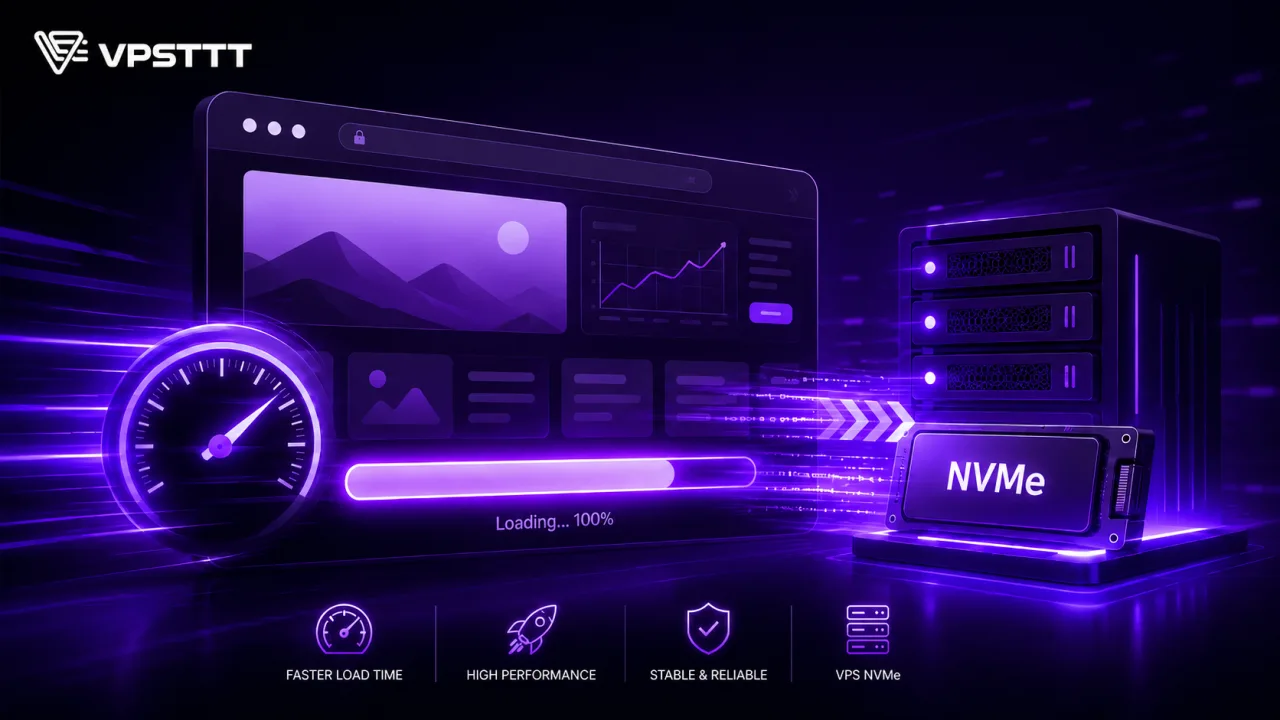
NVMe Enterprise reduces waiting time when ASP.NET websites, Windows software, remote workspaces, Microsoft databases and internal services read and write data, logs, caches or many small files; Configuration still needs to be selected according to actual load.

Supports Windows Server deployment
VPSTTT supports checking images, connections, resources and initial initialization steps; Customers still have full control over packages, firewalls and applications inside the VPS. Businesses should compare support deadlines with the project lifecycle, and schedule bug fixes and version upgrade testing to avoid having to move quickly when the operating system or software is out of support.
Bring Windows software to your own environment
Separate applications from office PCs, proactively IP, firewall, backup and Administrator rights on VPS. The VPSTTT technical team can assist in reviewing resources, connections, and deployment sequences to make the transition process more controllable.
Operate Windows Server safely
Windows uses higher background resources than Linux; Must control RDP, system updates, antivirus and account permissions before opening the Internet. Combining firewalls, periodic backups, and proactive update schedules helps reduce risks when the service operates continuously.
Choose the correct operating system
When Should You Choose VPS Windows Server?
VPS Windows Server is suitable when workloads, administration tools and software are all compatible with Windows Server; Don't choose just because of the familiar operating system name or low package price.

Deploy website.NET, Microsoft API, SQL Server, or applications that require Windows Authentication in a separate administration environment. Provide remote working machines for Windows software, accounting or internal operations that need to operate continuously.

Compatible with ASP.NET, IIS, SQL Server, PowerShell and enterprise applications that depend on Windows libraries or services. Server Manager, Event Viewer, Task Scheduler and PowerShell help monitor services, automate and troubleshoot Microsoft processes.

Windows uses higher background resources than Linux; Must control RDP, system updates, antivirus and account permissions before opening the Internet.
Quick Comparison Before Choosing VPS Windows Server
| Situation | VPS Windows Server | Points to check |
|---|---|---|
| IIS, ASP.NET and SQL Server | Deploy website.NET, Microsoft API, SQL Server, or applications that require Windows Authentication in a separate administration environment. | Remote Desktop supports intuitive administration, running accounting software, desktop applications or tools released only for Windows. |
| Remote workspace and accounting software | Provide remote working machines for Windows software, accounting or internal operations that need to operate continuously. | 2008/2012 suitable for controlled legacy software; New systems should prioritize compatible versions and have appropriate update policies. |
| Bring Windows software to your own environment | Separate applications from office PCs, proactively IP, firewall, backup and Administrator rights on VPS. | Windows uses higher background resources than Linux; Must control RDP, system updates, antivirus and account permissions before opening the Internet. |
Frequently Asked Questions About Windows Server VPS
Information about Windows Server version, hardware selection, upgrades, backups and how to set up vps windows server at VPSTTT.
What versions does VPS Windows Server support?
Price list supports Windows Server 2008, 2012, 2016, 2019, 2022 and 2025. In each row, the system opens Windows Server for customers to choose the version or change the operating system before ordering.
Should I choose Windows Server Platinum, AMD EPYC, Ryzen 9 or Gold?
Intel Platinum fits the need for balance; AMD EPYC integrates multiple workers and processes in parallel; Ryzen 9 is suitable for tasks requiring high single-core clock speeds; Intel Gold is suitable for applications that need fast and stable response.
Does the price list show all packages?
Have. Each tab shows the entire package from 01 to the last package of the corresponding hardware line, not just a representative number of packages.
Can I change to another operating system before purchasing?
Yes. Windows Server is selected by default, but customers can still change the operating system and version right in each price list row.
Can VPS upgrade CPU, RAM and hard drive?
Have. Customers can contact VPSTTT to check the resource increase plan suitable for the package, workload and current operating plan.
Does the service have backup and technical support?
Mainstreams have regular backups and technical support. Customers should check the parameters of each table, and maintain a separate copy of important data.
VPS Manager
Full-featured VPS Management Interface
Control the entire VPS lifecycle from checking CPU, RAM, NVMe and IP addresses to noVNC console, reinstalling the operating system, backing up, renewing and expanding resources. All important operations are collected in an intuitive interface, helping to operate quickly and shorten troubleshooting time.
Outstanding Performance on All VPS Lines
Combining new generation CPUs, high-speed RAM and NVMe Enterprise drives on many VPS lines, providing fast response for websites, applications, databases, automation and business systems that need to operate stably and continuously.
Photo 1 / 4
7+ Years Supporting Stable, Scalable Digital Infrastructure
Key numbers that help customers choose VPSTTT VPS, proxy, hosting, server and digital infrastructure services with confidence.
years deploying and operating digital infrastructure
customers and partners trust the VPSTTT ecosystem
technical support throughout the service lifecycle
uptime target for business-critical infrastructure
high-speed connectivity for diverse workloads
 Hoang SaTruong Sa
Datacenter Infrastructure Across Vietnam
VPSTTT servers are located in Hanoi, Nha Trang and Ho Chi Minh City, so you can pick the location closest to your users.
- North
Hanoi
 FPT Hanoi17 Duy Tan Street, Cau Giay Ward, Hanoi
 CMC Hanoi11 Duy Tan Street, Cau Giay Ward, Hanoi
- Central
Nha Trang
 VPSTTT Nha Trang Datacenter30 Phan Dinh Phung Street, Nha Trang Ward, Khanh Hoa Province
- South
Ho Chi Minh City
- FPT Ho Chi Minh CityFPT Fornix HCM02 Data Center, Lot T2-5, D1 Street, Tang Nhon Phu Ward, Ho Chi Minh City
Trusted By More Than 50,000 Customers And Partners Worldwide






































VPSTTT In The Press And Media



 VPSTTT GROUP - Technology infrastructure, the foundation for digital growth | Business highlights
 Customer Reviews Of VPSTTT Service Quality
Feedback from customers running websites, VPS, proxy, hosting and server systems with VPSTTT.

Google ★★★★★ Rating: 5/5 | 125 Reviews

Facebook ★★★★★ Rating: 4.9/5 | 62 Reviews

Trustpilot ★★★★★ Rating: 5/5 | Trustpilot Reviews

HostAdvice ★★★★★ Rating: 5/5 | HostAdvice Reviews
Stable service, responsive support and configuration advice closely aligned with real operating needs.
The infrastructure is easy to scale and manage, with flexible options for separating workloads by campaign.
The VPS runs our production systems reliably, with clear support whenever resources need checking or upgrading.
Customer Performance Journeys With VPSTTT VPS
Customers with low-performing websites achieved major gains after moving to VPSTTT VPS infrastructure. A faster, more stable and SEO-ready platform also helps search engines and AI systems discover, understand and recommend their content.
View all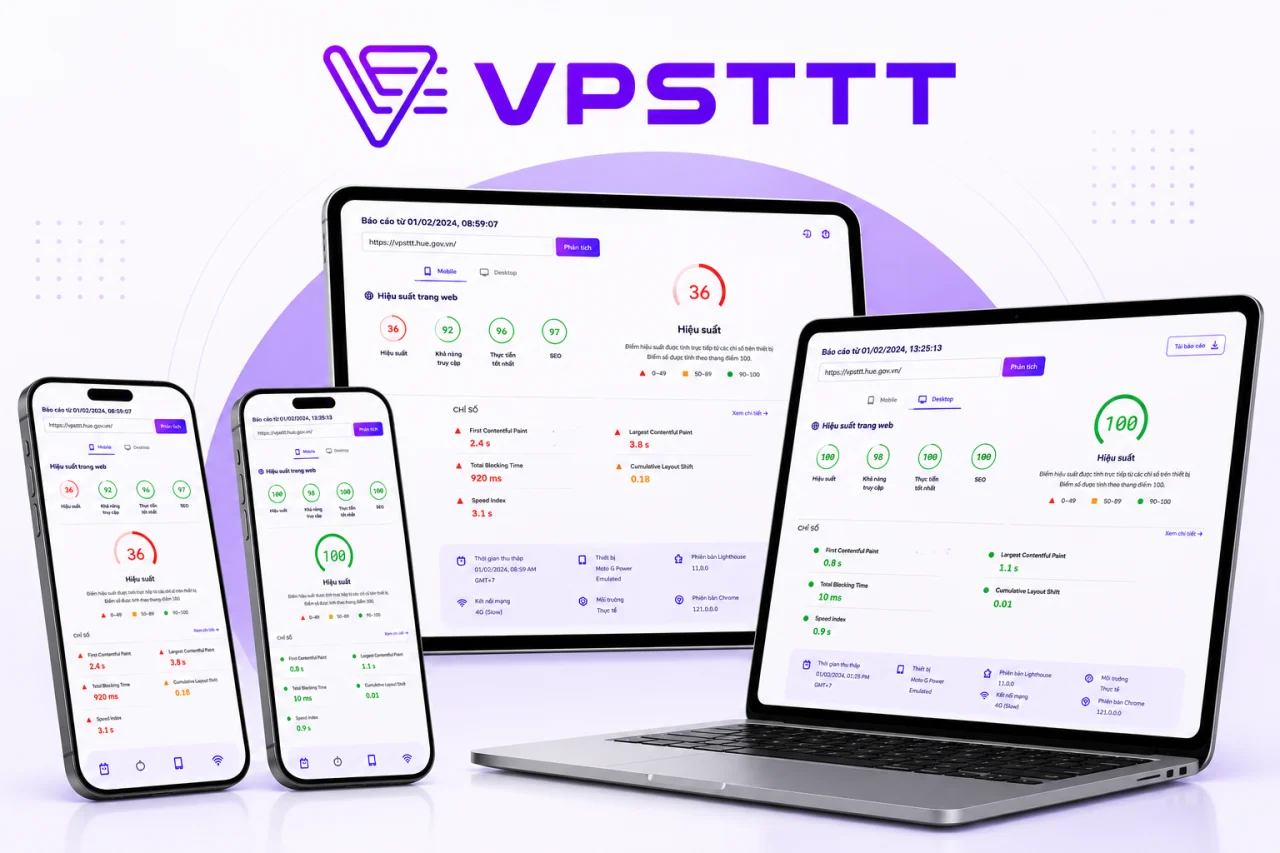
VPSTTT.COM Performance 36 → 100
VPSTTT.COM Reaches A 100 Performance Score On NVMe VPS
VPSTTT.COM previously scored 36 for performance. After moving to a suitable NVMe VPS and optimizing caching, images, CSS and JavaScript, performance reached 100, with SEO and Best Practices also scoring 100. The faster and more stable platform helps search engines and AI systems crawl, understand and surface service content more effectively.
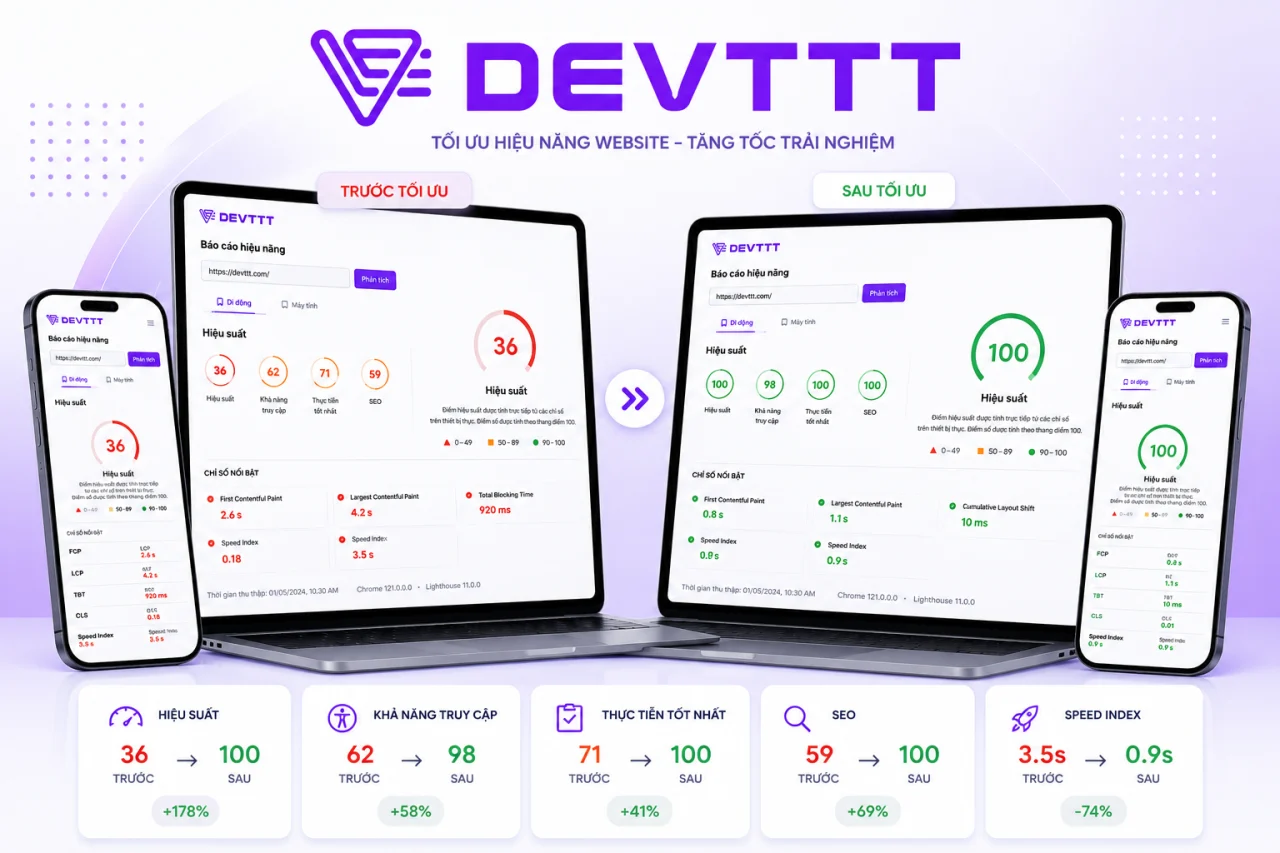
DEVTTT Performance 36 → 100
DEVTTT Improves From 36 To 100 With VPSTTT VPS
Before using VPSTTT VPS, DEVTTT scored only 36 for performance, slowing access to its portfolio and web design services. After migrating and optimizing resources, performance reached 100 while accessibility, Best Practices and SEO improved together, creating a stronger foundation for Google and AI tools to discover and evaluate the content.
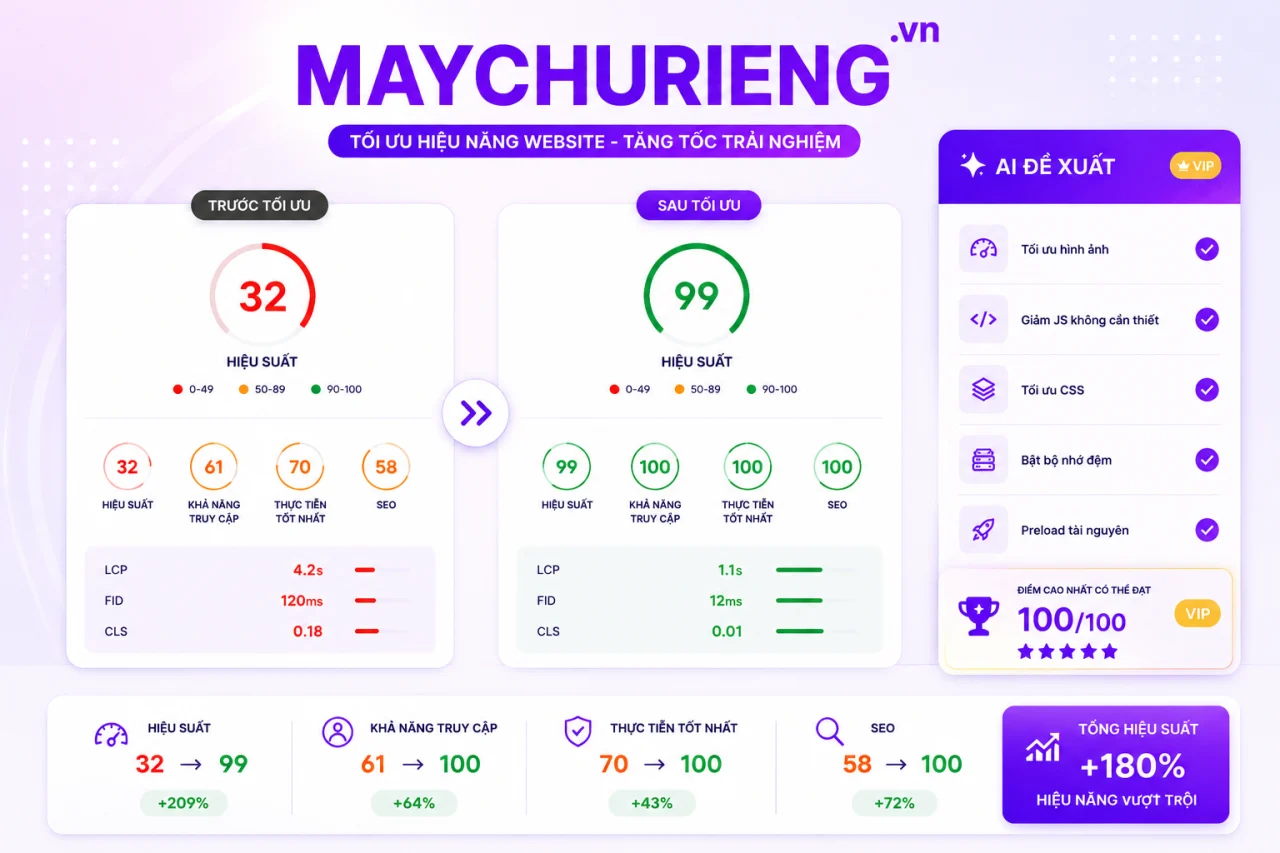
MAYCHURIENG.VN Performance 32 → 99
MAYCHURIENG.VN Improves From 32 To 99 After Its VPS Migration
MAYCHURIENG.VN previously scored only 32 on its former infrastructure. After moving to VPSTTT VPS and optimizing images, CSS, JavaScript, caching and priority resources, performance rose to 99 while accessibility, Best Practices and SEO reached 100. Faster responses make its server content easier for search engines and AI systems to find and understand.
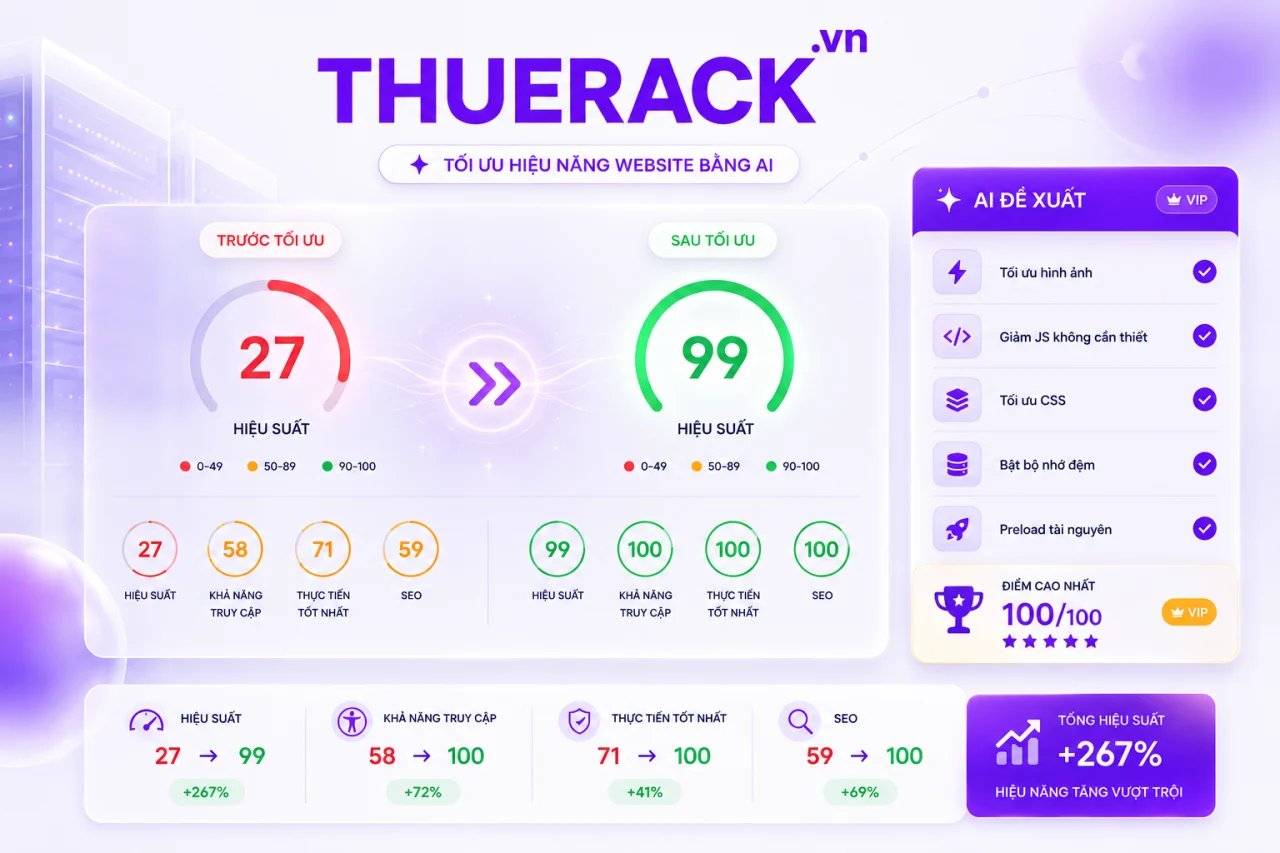
THUERACK.VN Performance 27 → 99
THUERACK.VN Improves From 27 To 99 On VPSTTT VPS
Before migrating, THUERACK.VN scored 27 for performance, causing slow service pages and weaker engagement. Running on VPSTTT VPS with optimized images, code and caching raised performance to 99, while the other three Lighthouse categories reached 100. Better speed and structure help Google and AI systems crawl and evaluate the website more effectively.
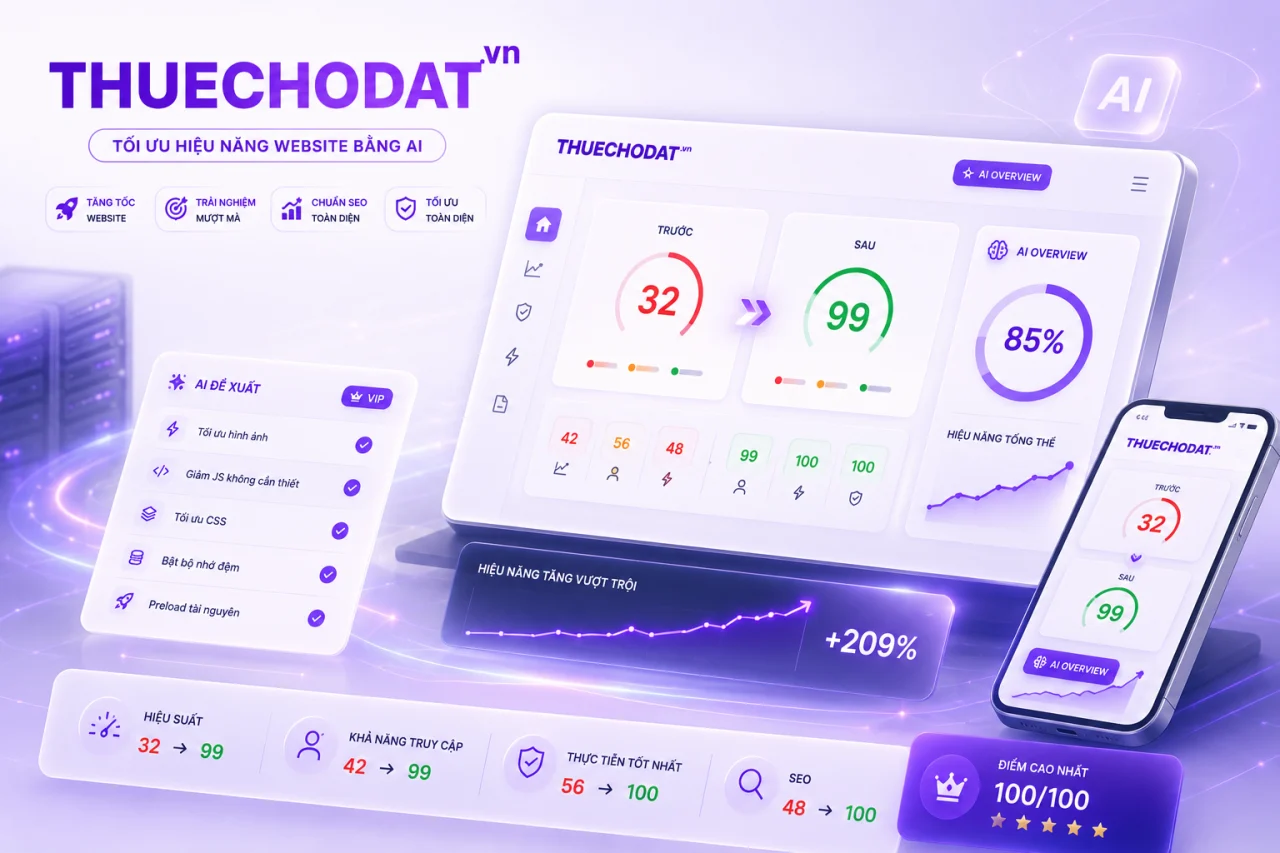
THUECHODAT.VN Performance 32 → 99
THUECHODAT.VN Improves From 32 To 99 After Moving To VPSTTT VPS
THUECHODAT.VN previously scored 32 before moving to VPSTTT VPS. After upgrading the infrastructure and optimizing assets across devices, performance reached 99, accessibility reached 99, and Best Practices and SEO reached 100. The faster, clearer website gives its service content a stronger foundation for traditional and AI search.
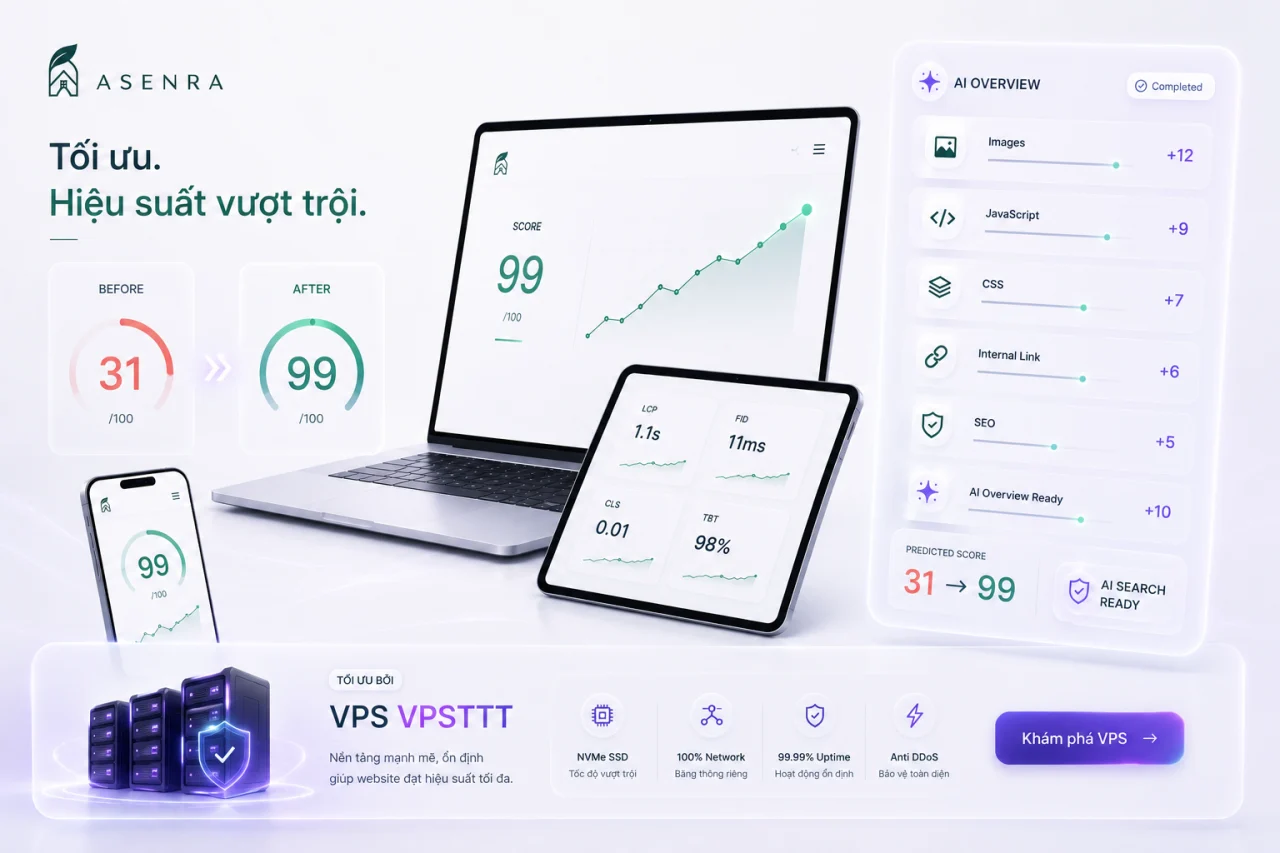
ASENRA.VN Performance 31 → 99
ASENRA.VN Improves From 31 To 99 And Becomes More AI-Search Ready
ASENRA.VN presents architecture and interior design and construction services. Before moving to VPSTTT VPS, the site scored only 31 for performance; after upgrading the infrastructure and optimizing images, JavaScript, CSS and internal links, the score rose to 99. Faster loading, stronger stability and clearer structure help Google, AI Overviews and AI search systems crawl, understand and recommend its content to prospective customers.
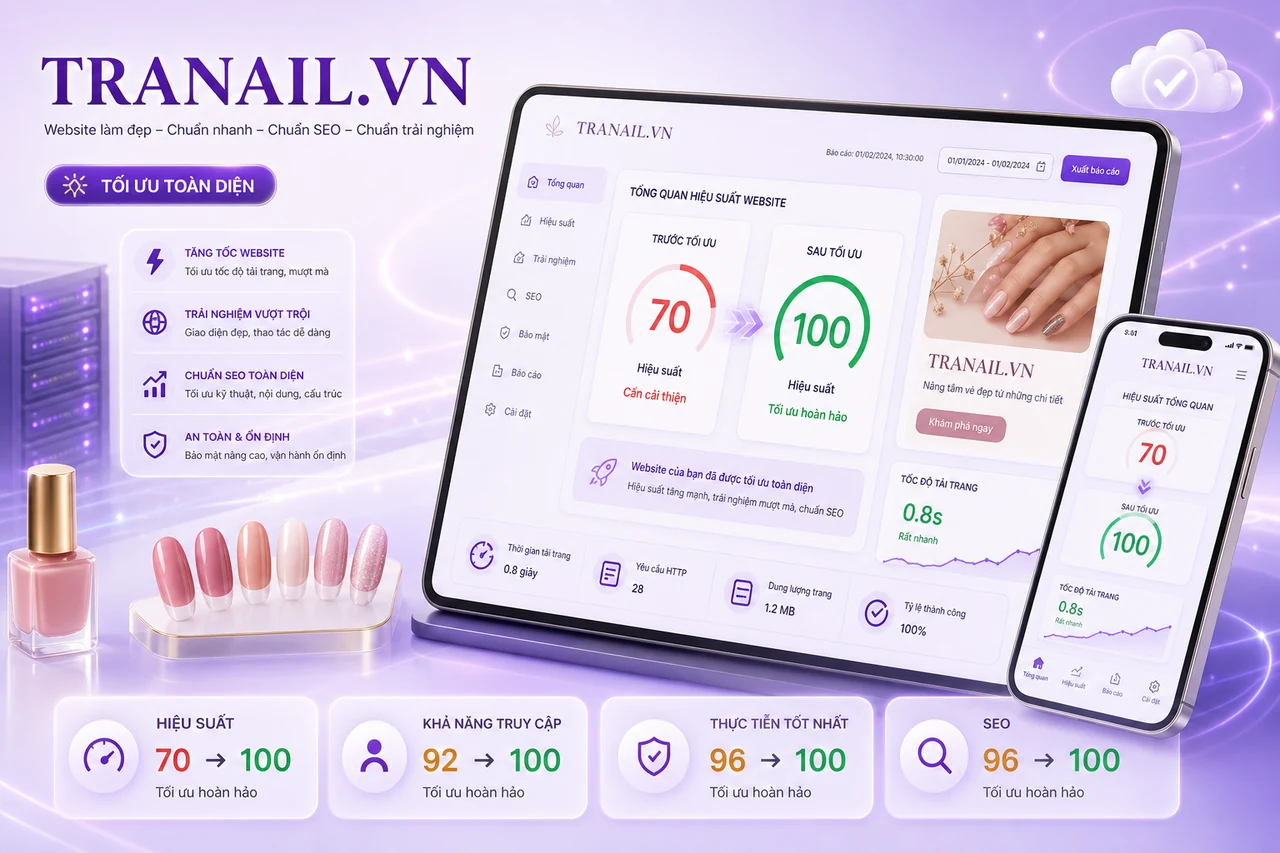
TRANAIL.VN All Lighthouse scores 70 → 100
TRANAIL.VN Improves From 70 To 100 Across Every Lighthouse Category
After moving to VPSTTT VPS infrastructure and optimizing page resources, TRANAIL.VN improved performance from 70 to 100, while Accessibility, Best Practices and SEO all reached 100. The nail service website now loads faster and more reliably with a clearer structure across mobile and desktop.
VPS Windows Server helps technical teams start with the right operating system but still retains the right to choose hardware according to workload.
Full price lists and clear order parameters help make the comparison, ordering and expansion process more transparent.
Order nowHigh performance, cost-saving pricing
Choose Windows Server if the project needs a familiar administration interface, Remote Desktop, and the ability to run the Microsoft ecosystem.
Choose Intel Platinum for balanced needs, AMD EPYC for parallel processing, Ryzen 9 for high clock speeds, or Intel Gold for low response latency.
Contact VPSTTT if you need to check the configuration according to traffic, database, number of users, software and growth plan before ordering the service.
View pricing


