


First-time AI builders
You describe the idea and the AI tool writes the code. You need a place to publish it without learning server administration.

Built a website with Claude Code, Codex, Cursor, Lovable, Bolt or v0? Run the build, zip the output folder and upload it to VPSTTT cPanel Hosting: your site goes live on your own domain with free SSL, from just $1.12/month.
7-day money-back guarantee if you are not satisfied
You bring the idea and the content, the AI tool writes the code. Getting it online only takes an easy, low-cost hosting plan.
You describe the idea and the AI tool writes the code. You need a place to publish it without learning server administration.

Sales pages, personal profiles, event pages, static blogs: upload once, run reliably, keep costs low.

Every plan includes unlimited addon domains, so your clients' websites can live together in one cPanel account.

Publish a draft build on a subdomain so clients can review and comment before it goes live on the main domain.
No server command line needed: everything on the hosting side is point-and-click in cPanel.
Ask your AI tool to run it, or run the project build command yourself. You get a dist/, out/ or build/ folder with index.html, CSS, JS and images.
npm run build Open the build folder, select everything inside and compress it into one file such as website.zip. Zip the contents so index.html sits at the site root.
dist/ → website.zip In cPanel File Manager, upload website.zip into public_html and click Extract. Point your domain to the hosting, enable free SSL and the site runs on https.
public_html/index.html Any tool works as long as the final result is a static website (HTML, CSS, JS) or PHP code.
 Claude Code
 Codex
 Cursor
 Gemini CLI
 Cline
 Lovable
 Bolt
 v0
With Lovable, Bolt or v0: download the source code (or sync it via GitHub), run the build and upload the output folder to your hosting.
| Framework / setup | Folder to upload |
|---|---|
| Astro (static by default) | dist/ |
| Vite + React / Vue / Svelte | dist/ |
| Next.js with output: 'export' | out/ |
| Create React App | build/ |
| Nuxt (nuxt generate) | .output/public/ |
| Plain HTML / CSS / JS | The whole project folder |
| PHP + MySQL (light backend) | PHP code + a database created in cPanel |
This hosting runs static exports and PHP only. If your site needs an always-on Node.js server (Next.js SSR, API Routes, Server Actions), choose a VPS from the section below.
Uses the same VPSTTT cPanel Hosting plans: same resources, same prices. Light static sites run well on small plans; pick a larger plan for many images, videos or domains.
| Plan | vCPU | RAM | Storage | Price | Order |
|---|---|---|---|---|---|
| Hosting 01 GB | vCPU 1 vCPU | RAM 1 GB | Storage 1 GB | $1.12/month | Order |
| Hosting 02 GB | vCPU 1 vCPU | RAM 1 GB | Storage 2 GB | $1.24/month | Order |
| Hosting 05 GB | vCPU 2 vCPU | RAM 2 GB | Storage 5 GB | $2.60/month | Order |
| Hosting 10 GB | vCPU 2 vCPU | RAM 3 GB | Storage 10 GB | $3.60/month | Order |
| Hosting 20 GB | vCPU 3 vCPU | RAM 3 GB | Storage 20 GB | $5.40/month | Order |
| Hosting 50 GB | vCPU 3 vCPU | RAM 4 GB | Storage 50 GB | $9.40/month | Order |
| Hosting 100 GB | vCPU 4 vCPU | RAM 4 GB | Storage 100 GB | $16/month | Order |
| Hosting 200 GB | vCPU 4 vCPU | RAM 6 GB | Storage 200 GB | $28.80/month | Order |
| Hosting 500 GB | vCPU 6 vCPU | RAM 8 GB | Storage 500 GB | $66.80/month | Order |
| Hosting 1000 GB | vCPU 8 vCPU | RAM 10 GB | Storage 1000 GB | $128.80/month | Order |


Hosting suits static sites and PHP. Apps that need a program running on the server all the time need a VPS with full admin access.
 VPS Vibe Coding A VPS with help setting up your AI agent workspace and taking your product to production. View service VPS Vietnam NVMe VPS located in Vietnam with full root access for Node.js, Python and Docker. View service
 VPS n8n Run n8n workflow automation reliably 24/7 on your own server. View service
 VPS OpenClaw Self-host the OpenClaw AI assistant on Ubuntu 24.04 with NVMe and full root access. View service
Vibe Coding Hosting should be selected by workload goal, user location, security needs and scaling path, not only by the lowest monthly price.
Best when you need infrastructure that is easy to deploy, technically supported and scalable.
Begin from real usage, then upgrade based on traffic, data size and system criticality.
Review security, backup, budget, SLA and support scope before ordering long-term.
| Situation | Vibe Coding Hosting | Also consider |
|---|---|---|
| Need fast deployment | Use a ready service with support | Self-host if you have a strong DevOps team |
| Need cost control | Start with enough and upgrade later | Commit long term only after workload stabilizes |
| Need lower risk | Prioritize backup, security and support process | Add monitoring for critical systems |
What AI builders usually ask before putting a website on hosting.
It is the same VPSTTT cPanel Hosting service with the same plans and prices. This page is a dedicated guide for people who build websites with AI tools: how to build, zip and upload a static site.
Yes, if the project exports a static site. Download the source code, run npm install and npm run build, then upload the dist/ folder (or out/ for Next.js with output: 'export') to public_html. Projects that need an always-on Node.js server should use a VPS.
Yes, as a static export: set output: 'export' in next.config, run next build and upload the out/ folder. Server features such as SSR, API Routes, Server Actions and Middleware need a VPS.
No. You upload one .zip file in cPanel File Manager and click Extract. If you get stuck at any step, the VPSTTT technical team supports you 24/7 via Zalo.
The hosting includes PHP and MySQL: ask your AI tool to write a small PHP file that receives the form, saves it to a database created in cPanel or sends it with email on your domain. Apps written in Node.js or Python should use a VPS.
Yes. Every plan includes free SSL, unlimited addon domains and email on your domain. If you do not have a domain yet, you can register one with VPSTTT.
Run the build again, zip the new folder and upload it over public_html; delete the old asset folder (e.g. assets/) first so no stale files remain. Hosting is backed up daily, so mistakes can be restored.
Manage your website, domains, SSL, email, databases, storage, and backups in one familiar area. The intuitive cPanel interface makes it easy for beginners to use, while still providing all the necessary tools for administrators and businesses.
Monitor domain names, IP addresses, storage capacity, bandwidth, Hosting status and duration to control website resources clearly right from one screen.
Key numbers that help customers choose VPSTTT VPS, proxy, hosting, server and digital infrastructure services with confidence.
years deploying and operating digital infrastructure
customers and partners trust the VPSTTT ecosystem
technical support throughout the service lifecycle
uptime target for business-critical infrastructure
high-speed connectivity for diverse workloads
 Hoang SaTruong Sa
VPSTTT servers are located in Hanoi, Nha Trang and Ho Chi Minh City, so you can pick the location closest to your users.










































 VPSTTT GROUP - Technology infrastructure, the foundation for digital growth | Business highlights
Feedback from customers running websites, VPS, proxy, hosting and server systems with VPSTTT.


Stable service, responsive support and configuration advice closely aligned with real operating needs.
The infrastructure is easy to scale and manage, with flexible options for separating workloads by campaign.
The VPS runs our production systems reliably, with clear support whenever resources need checking or upgrading.
Customers with low-performing websites achieved major gains after moving to VPSTTT VPS infrastructure. A faster, more stable and SEO-ready platform also helps search engines and AI systems discover, understand and recommend their content.
View all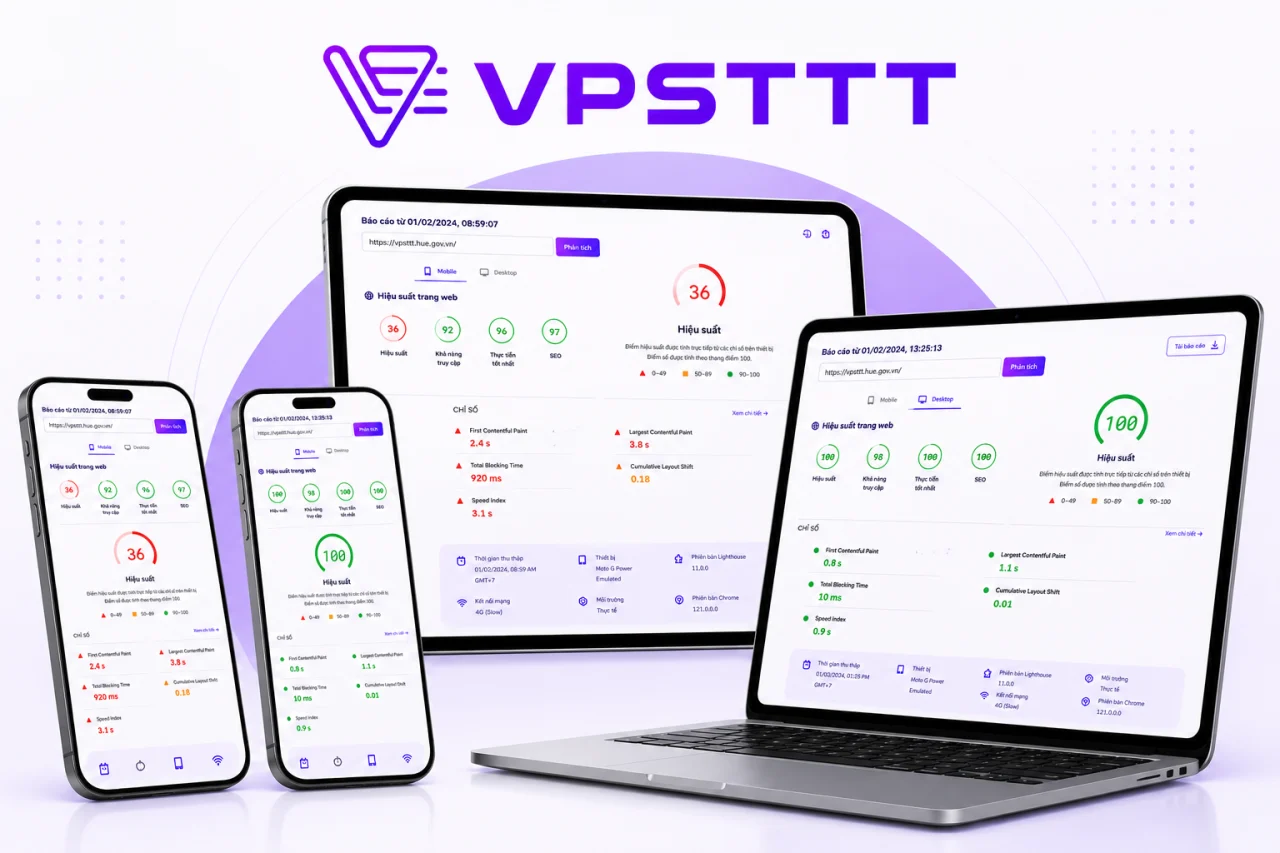
VPSTTT.COM previously scored 36 for performance. After moving to a suitable NVMe VPS and optimizing caching, images, CSS and JavaScript, performance reached 100, with SEO and Best Practices also scoring 100. The faster and more stable platform helps search engines and AI systems crawl, understand and surface service content more effectively.
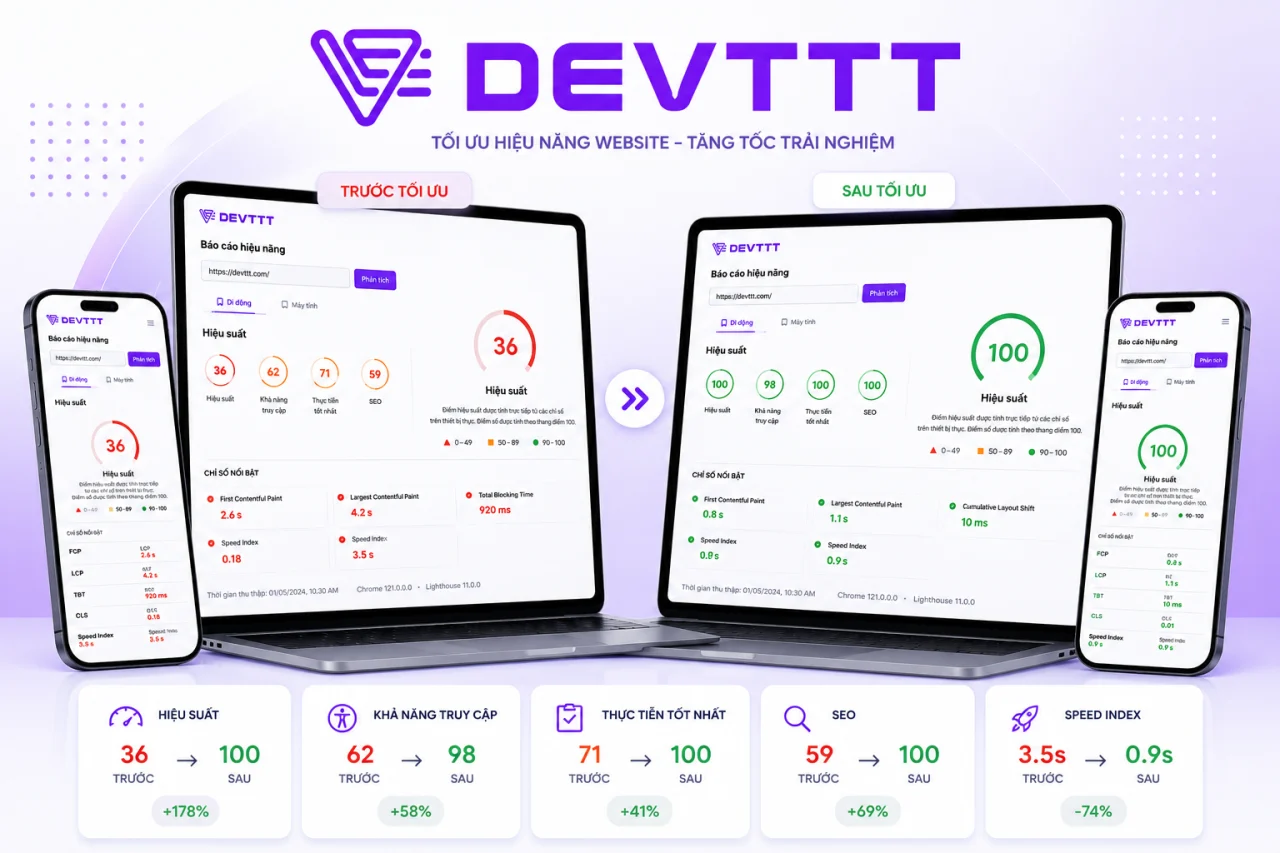
Before using VPSTTT VPS, DEVTTT scored only 36 for performance, slowing access to its portfolio and web design services. After migrating and optimizing resources, performance reached 100 while accessibility, Best Practices and SEO improved together, creating a stronger foundation for Google and AI tools to discover and evaluate the content.
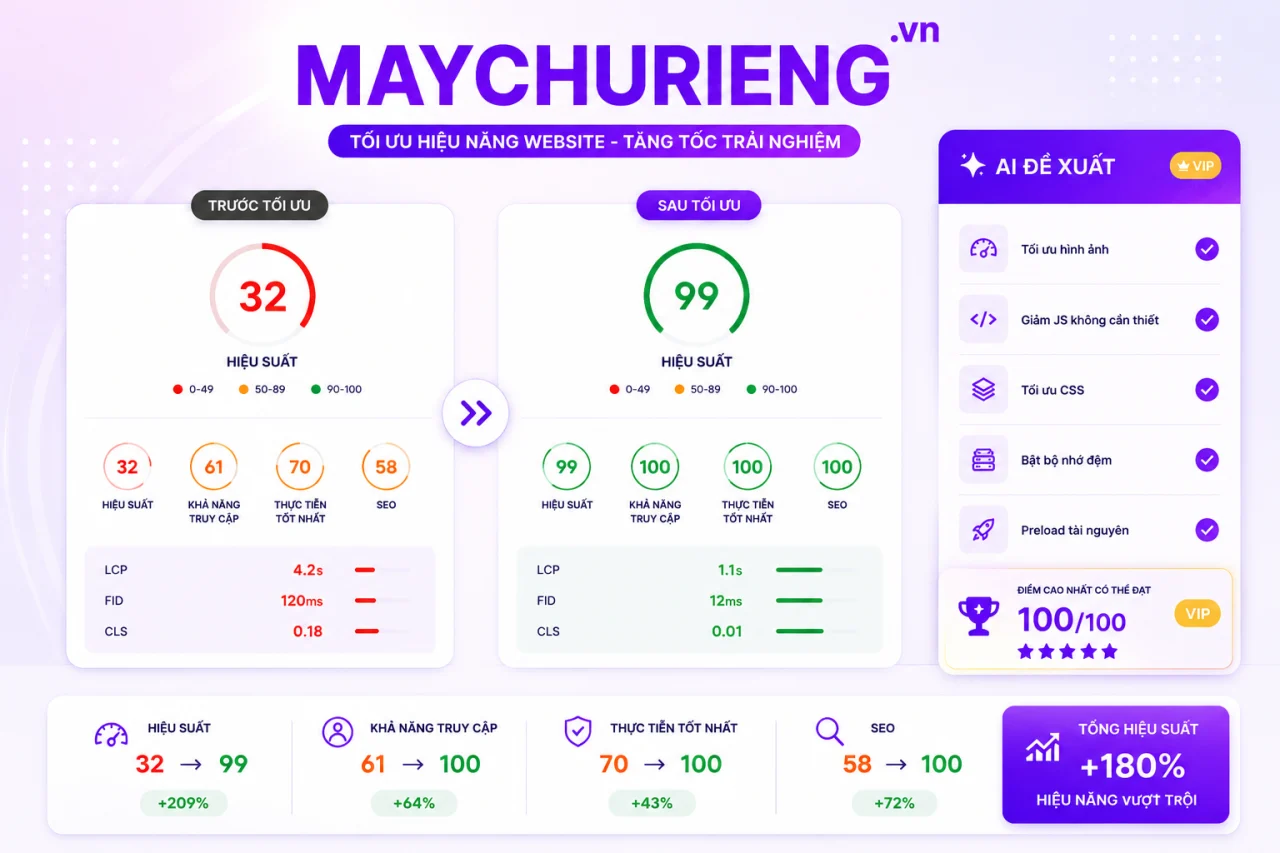
MAYCHURIENG.VN previously scored only 32 on its former infrastructure. After moving to VPSTTT VPS and optimizing images, CSS, JavaScript, caching and priority resources, performance rose to 99 while accessibility, Best Practices and SEO reached 100. Faster responses make its server content easier for search engines and AI systems to find and understand.
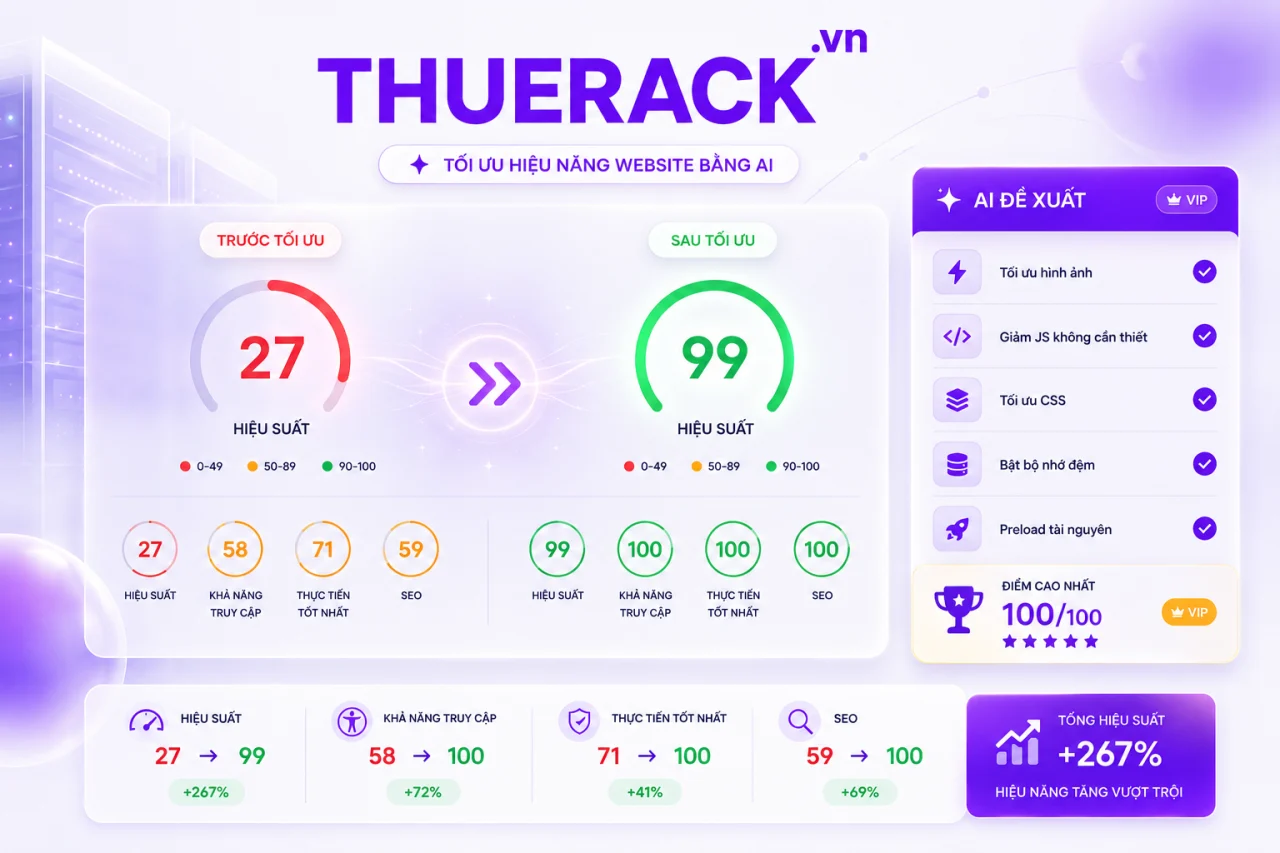
Before migrating, THUERACK.VN scored 27 for performance, causing slow service pages and weaker engagement. Running on VPSTTT VPS with optimized images, code and caching raised performance to 99, while the other three Lighthouse categories reached 100. Better speed and structure help Google and AI systems crawl and evaluate the website more effectively.
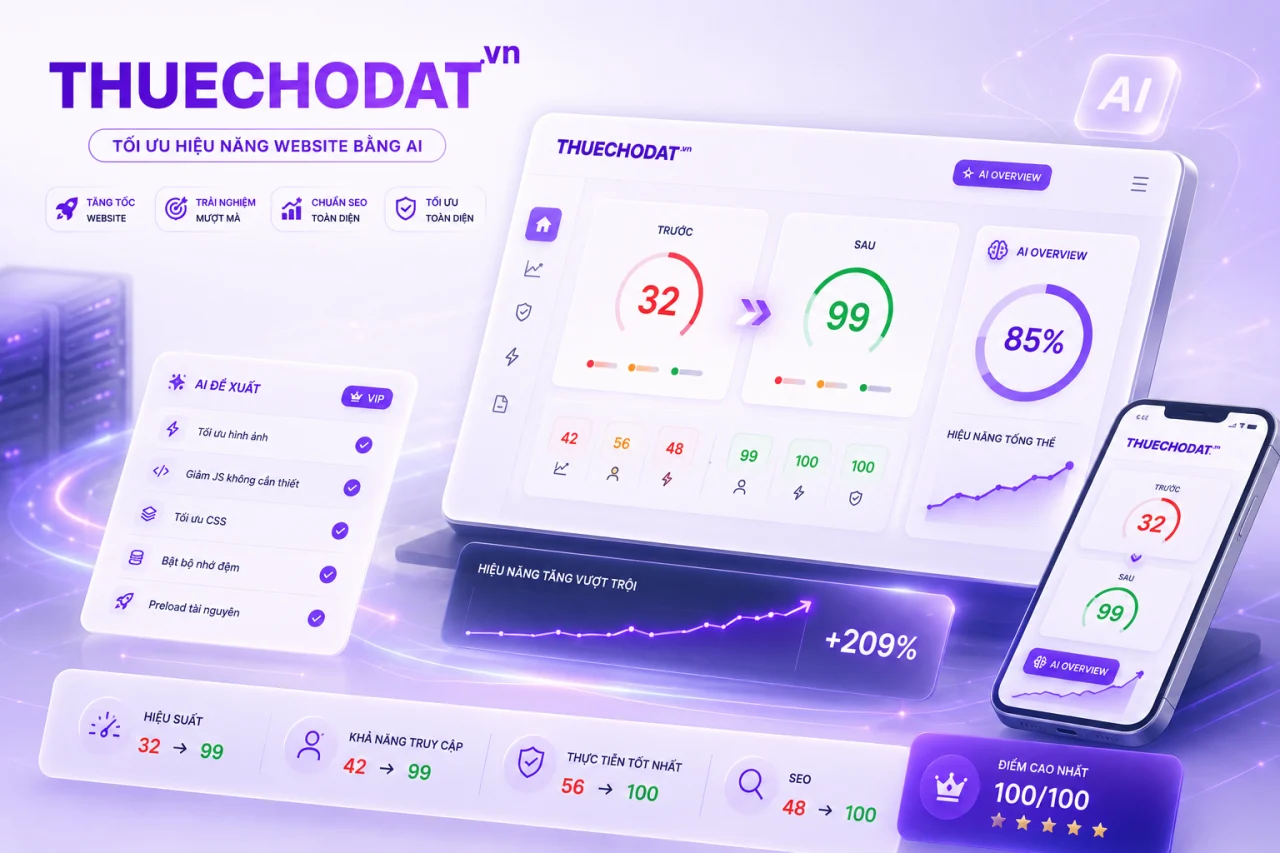
THUECHODAT.VN previously scored 32 before moving to VPSTTT VPS. After upgrading the infrastructure and optimizing assets across devices, performance reached 99, accessibility reached 99, and Best Practices and SEO reached 100. The faster, clearer website gives its service content a stronger foundation for traditional and AI search.
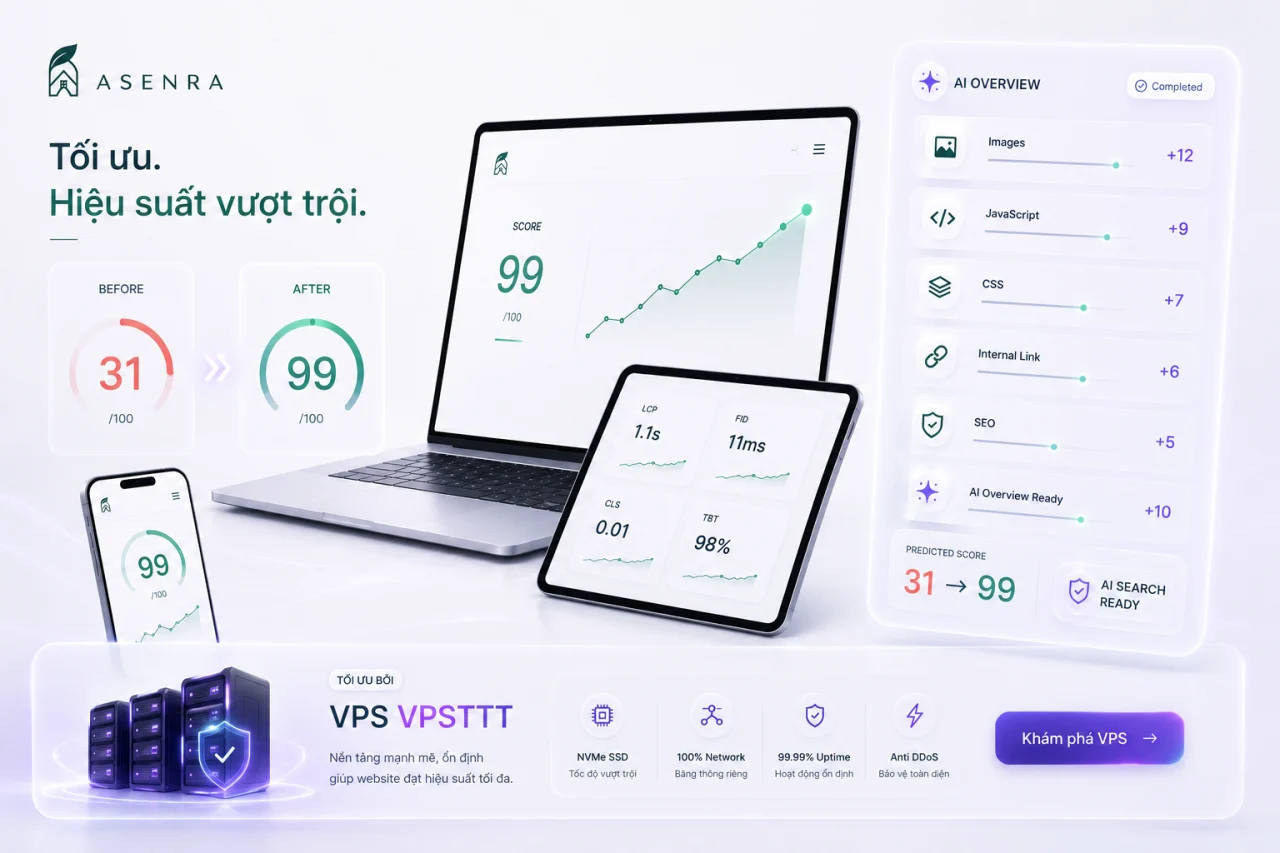
ASENRA.VN presents architecture and interior design and construction services. Before moving to VPSTTT VPS, the site scored only 31 for performance; after upgrading the infrastructure and optimizing images, JavaScript, CSS and internal links, the score rose to 99. Faster loading, stronger stability and clearer structure help Google, AI Overviews and AI search systems crawl, understand and recommend its content to prospective customers.
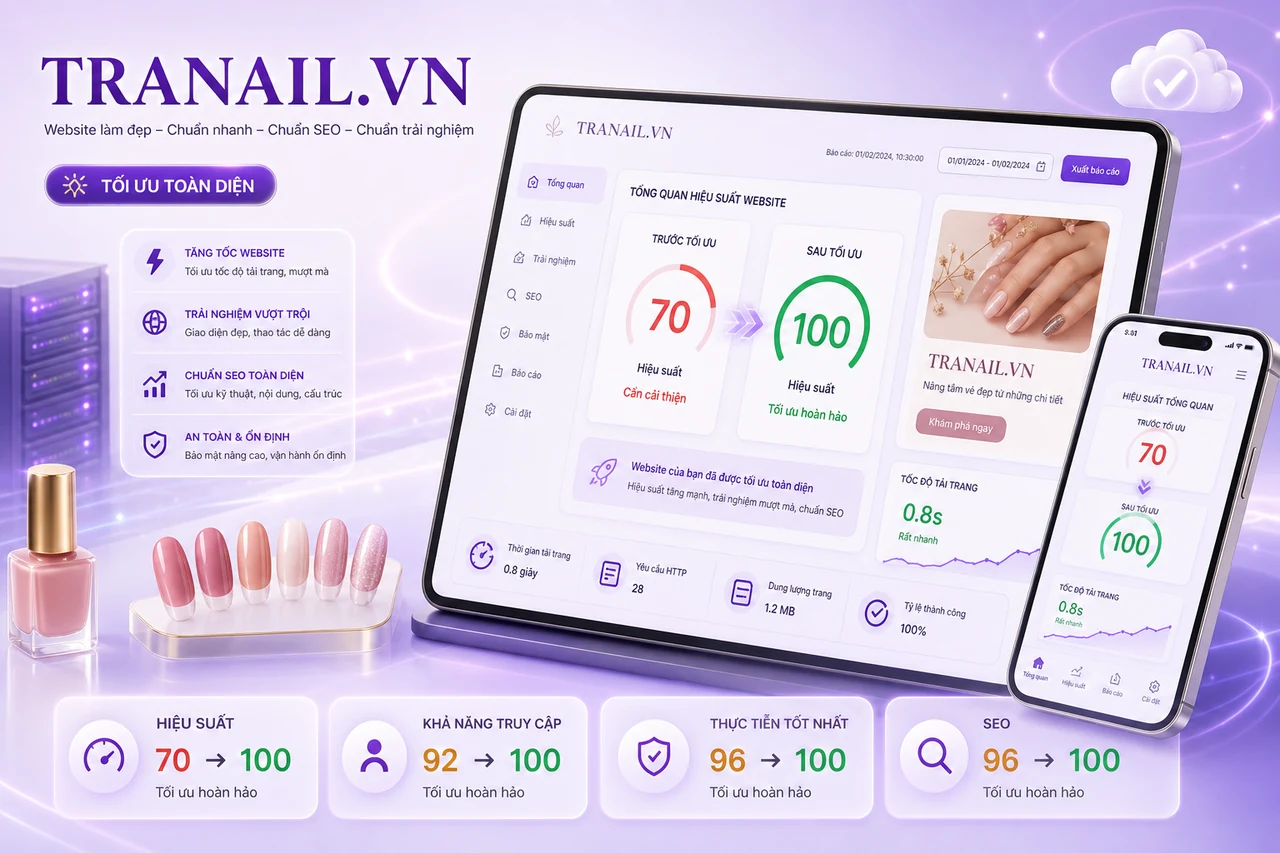
After moving to VPSTTT VPS infrastructure and optimizing page resources, TRANAIL.VN improved performance from 70 to 100, while Accessibility, Best Practices and SEO all reached 100. The nail service website now loads faster and more reliably with a clearer structure across mobile and desktop.
Building a website with AI takes a few hours; putting it online with Vibe Coding Hosting takes a few minutes.
Start with a small plan and upgrade as your traffic grows, without changing how you work.
Choose a planPick a cPanel Hosting plan, upload your build and connect your own domain: your site gets SSL, email on your domain and daily backups.
Not sure whether you need hosting or a VPS? Send us your project link or a short description and the VPSTTT team will recommend a plan.
Chat with us on Zalo


