Solutions · Free download

Proxy extensions & apps

The Proxy Nhanh extension sets a proxy for your browser (Chrome, Coc Coc, Edge, Brave). The VPSTTT Proxy App changes the IP of your whole Windows computer or Android phone. Free, works with proxies from any provider, with step-by-step install guides.

  • No ads
  • No account needed
  • Your data stays on your device
  • SHA-256 for every file
VPSTTT Proxy App on Windows and the Proxy Nhanh extension popup
  • $0Free, no ads
  • 4Platforms: Chrome / Edge / Coc Coc, Firefox, Windows, Android
  • 9Proxy protocols in the app
  • ~1 minTo install the browser extension

Extensions and apps 2

  • VPSTTT Proxy Nhanh

    Browser extension · download the installer below · Free

    Set a proxy for your browser in one click

    Paste a proxy list, automatic login, see your IP instantly, per-site rules, real IP leak protection.

    • Chrome
    • Coc Coc
    • Brave
    • Edge
  • VPSTTT Proxy App

    App · version 1.10.0 · Free

    Change the IP of your whole computer or phone with a proxy

    Paste a proxy, tap Connect: every app on the device goes through the proxy. Bulk proxy checking, proxy rotation, per-app / per-domain rules and IP leak protection (DNS, IPv6, kill switch).

    • Windows 10 / 11
    • Android 10+

Get started in 3 steps

No VPSTTT account and no network settings needed.

  1. Get a proxy

    Use any proxy you already have from any provider, or buy a Vietnam proxy from VPSTTT (IPv4, IPv6, residential).

  2. Download and install

    Only need a new IP in the browser: install the Proxy Nhanh extension. Need it for the whole computer / phone: install VPSTTT Proxy App. Follow the install guide.

  3. Paste, turn on and check

    Paste your proxy list, then tap On (extension) or Connect (app). The IP in use shows right away; the app also has a Leak test page.

What can you use it for?

The jobs VPSTTT customers use proxies for most, ready to go with the extension and the app.

  • Many accounts, one IP each

    Manage social media and marketplace accounts: each browser profile or device uses its own proxy.

  • See websites and ads by region

    Check ads, search results and prices shown in each province / country with a proxy from that region.

  • Software, games, phone apps

    The app routes the whole device through the proxy: even software without proxy settings gets the new IP.

  • Test websites and APIs

    Test sites and APIs from different IPs / ISPs; send only the domain under test through the proxy and everything else direct.

  • Rotating and 4G proxies

    Switch proxies every N minutes, or tap Change IP to call your provider's IP-change link without retyping anything.

  • Keep your real IP hidden

    Blocks IP leaks via WebRTC, DNS and IPv6; if the proxy drops, traffic is blocked instead of going out with your real IP.

Proxy Nhanh: a browser proxy in one click

A lightweight extension for Chrome, Coc Coc, Edge and Brave. No system network settings and no extra software.

  • Paste a whole list

    ip:port, ip:port:user:pass, user:pass@ip:port, socks5://… in any order; duplicates are removed.

  • Automatic proxy login

    Proxies with a username / password are filled in for you, no retyping on every page.

  • IP, country, latency

    See the IP in use instantly; bulk-check proxies alive / dead and measure latency.

  • Per-site rules

    Choose which sites use which proxy, go direct or are blocked. Right-click a page to add a rule fast.

  • Real IP leak protection

    Blocks WebRTC IP leaks; if a proxy dies the page is blocked instead of leaking your real IP.

  • Rotate and change IP

    Auto-switch proxies every N minutes; for 4G / rotating proxies tap Change IP to call the provider link.

VPSTTT Proxy App: change the IP of the whole device

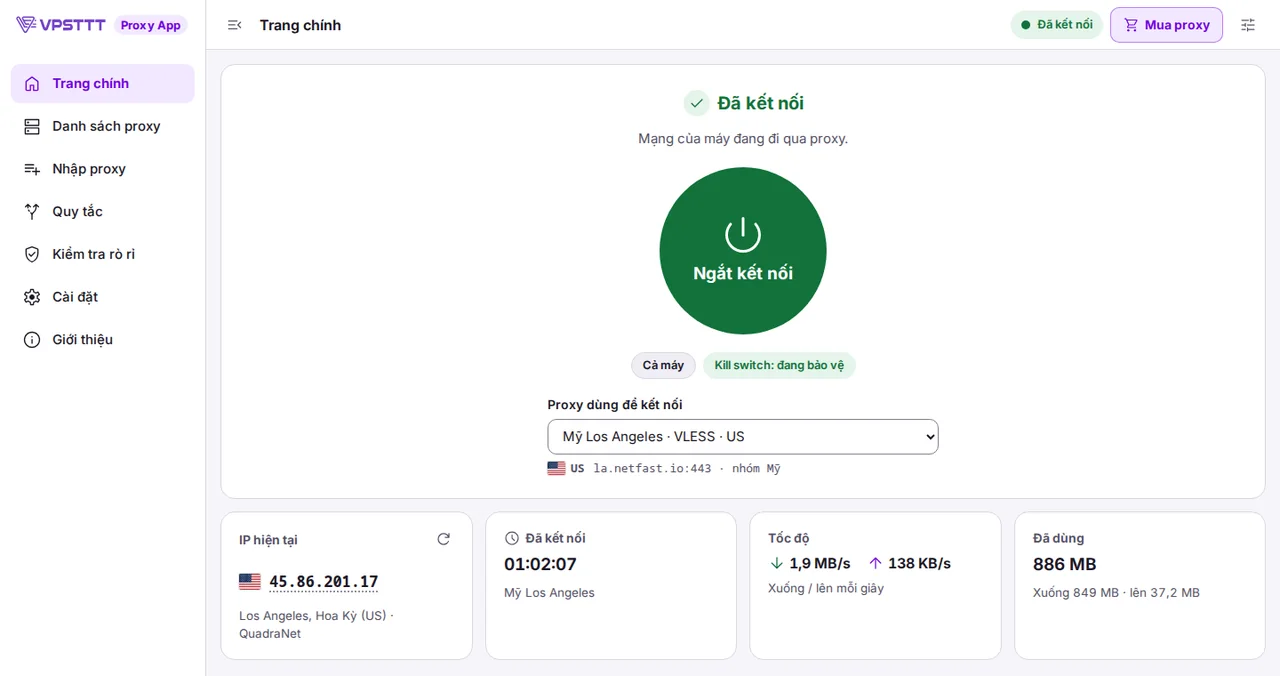
An app for Windows and Android. Unlike a browser extension, every app on the device goes through the proxy, and the network is blocked the moment the proxy drops so your real IP never leaks.

  • Whole-device IP change: browsers, software, games and phone apps all go through the proxy
  • Imports every format: ip:port:user:pass, HTTP, SOCKS5, Shadowsocks, VMess, VLESS, Trojan, Hysteria2, TUIC, WireGuard, subscription links
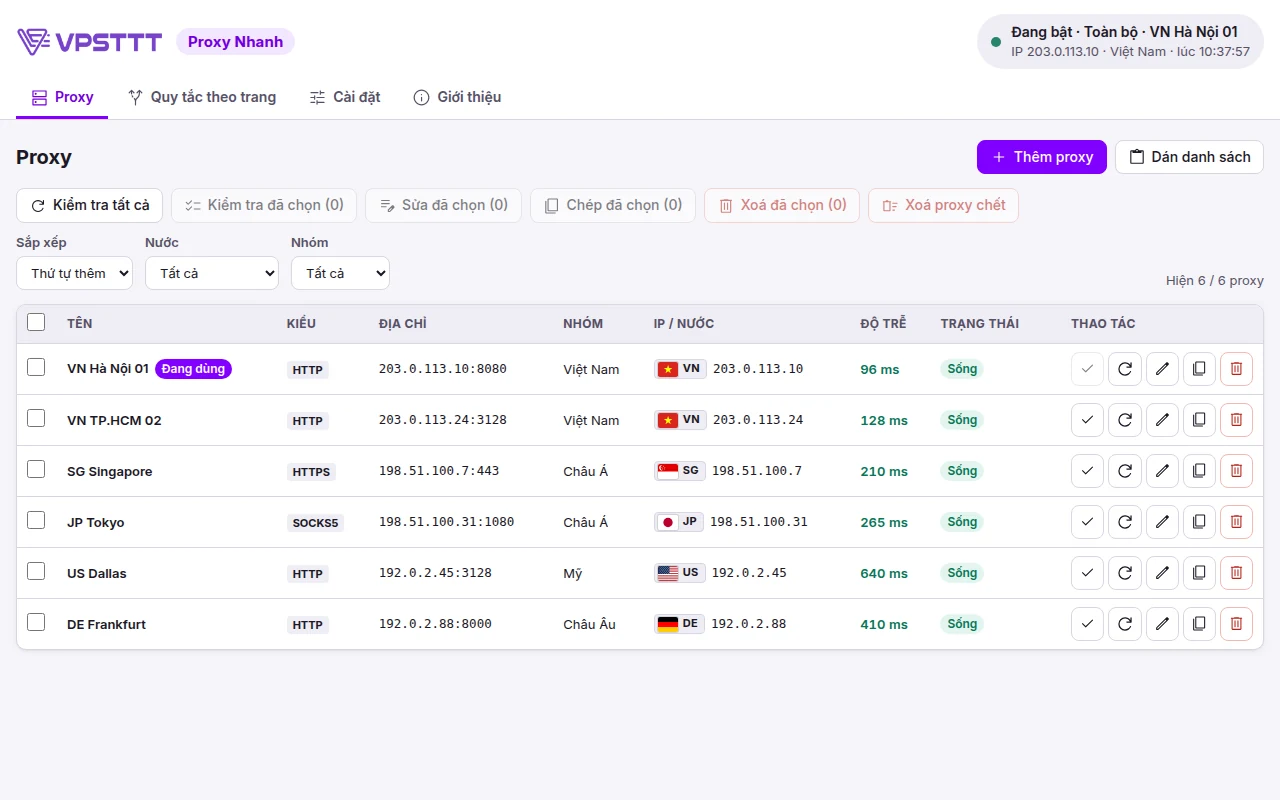
  • Bulk checking: alive / dead, latency, exit IP, country, ISP
  • Real IP leak protection: DNS through the proxy, IPv6 blocked, kill switch cuts the network when the proxy drops
  • Rules: choose which apps / domains / IPs use the proxy, go direct or are blocked
  • Auto-rotate proxies every N minutes, Change IP button for 4G proxies, app lock with password, signed automatic updates
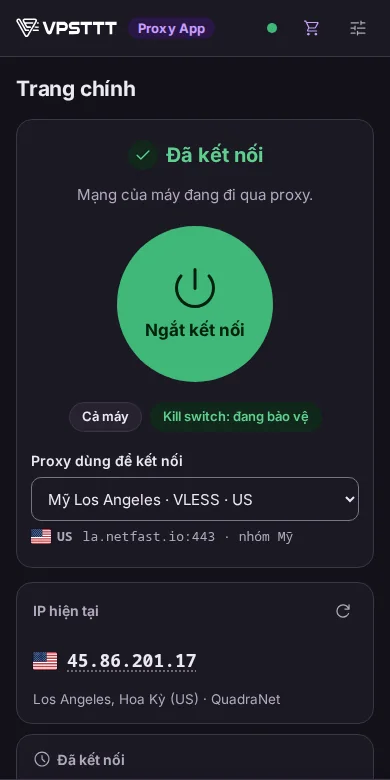
VPSTTT Proxy App on Windows: connected, kill switch on, current IP, speed and data usedProxy list in VPSTTT Proxy App: check all, country, exit IP, latency, alive / dead statusVPSTTT Proxy App on an Android phone, dark mode: connected, current IP

Extension or app: which one?

Only working on the web: use the Proxy Nhanh extension. Need software, games or your phone to go through the proxy: use VPSTTT Proxy App.

CriteriaProxy Nhanh extensionVPSTTT Proxy App
Changes the IP ofWeb pages opened in the browser where it is installedEvery app on the device: browsers, software, games, phone apps
DevicesComputers with Chrome, Coc Coc, Edge, Brave (Windows, macOS, Linux)Windows 10 / 11 64-bit, Android 10 or later
Proxy typesHTTP, HTTPS, SOCKS (SOCKS with password on Firefox only)HTTP, SOCKS5, Shadowsocks, VMess, VLESS, Trojan, Hysteria2, TUIC, WireGuard
Real IP leak protectionBlocks WebRTC leaks, blocks pages when the proxy is deadDNS through the proxy, IPv6 blocked, kill switch blocks the whole device when the proxy drops
Routing rulesPer websitePer app, domain, IP
InstallationAbout 1 minute, no admin rights neededWindows needs admin rights; Android asks for VPN permission when connecting
UpdatesDownload the new file and extract over the old one (automatic once on the Chrome Web Store)Checks and installs signed new versions automatically
Best forWeb work, multiple accounts, viewing sites by regionSoftware, games and phone apps that need the proxy IP

Download the latest version

Files are served directly from VPSTTT servers. Use the SHA-256 hash to confirm the download has not been altered (Windows: certutil -hashfile <file> SHA256).

  • Proxy Nhanh for Chrome, Coc Coc, Edge, Brave

    Browser extension · Chrome, Coc Coc, Microsoft Edge, Brave (Windows, macOS, Linux)

    Version
    1.5.0
    Size
    857 KB
    File type
    zip

    File name: VPSTTT-Proxy-Nhanh-1.5.0-chrome.zip

    SHA-256: 755653e093e33eea461dca3b708b709e94ea2b346cca32144d507ade517fde01

  • Proxy Nhanh for Firefox (trial)

    Browser extension · Firefox: temporary install, removed when Firefox closes

    Version
    1.5.0
    Size
    860 KB
    File type
    zip

    File name: VPSTTT-Proxy-Nhanh-1.5.0-firefox.zip

    SHA-256: 5cf37cd0fb9a0a57412786eb961c72d738e70a0d1fd43d3e8b5de95b758dd517

  • VPSTTT Proxy App for Windows

    Windows app · Windows 10 / 11, 64-bit

    Version
    1.10.0
    Size
    25.8 MB
    File type
    exe

    File name: VPSTTT-Proxy-App-1.10.0-setup.exe

    SHA-256: c37c58e0e063c70588f96f18260252864807c357d8af32961bac5041e5f45016

  • VPSTTT Proxy App for Android

    Android app · Android 10 or later

    Version
    1.10.0
    Size
    52.3 MB
    File type
    apk

    File name: VPSTTT-Proxy-App-Android-1.10.0.apk

    SHA-256: b916deb91e42993f26a0afdd7ea26ec77c5438243df6028543573b3906dd4c4d

Step-by-step install guides

Pick the guide that matches the file you downloaded. Need help: hotline +84 328 812 674 or VPSTTT on Zalo.

Install Proxy Nhanh on Chrome, Coc Coc, Edge, Brave

Use the file VPSTTT-Proxy-Nhanh-1.5.0-chrome.zip. No admin rights and no account needed.

  1. Download the zip, right-click it → Extract All into a permanent folder, for example Documents\Proxy-Nhanh. Do not delete this folder after installing: the browser runs the extension from it.
  2. Open the extensions page by typing in the address bar: Chrome chrome://extensions, Coc Coc coccoc://extensions, Edge edge://extensions, Brave brave://extensions.
  3. Turn on Developer mode: top right corner (Edge: left column).
  4. Click Load unpacked and choose the extracted folder (the one that contains manifest.json).
  5. Click the puzzle icon in the toolbar → pin VPSTTT Proxy Nhanh. Open Settings → Paste proxy list, then switch it On.

New version: download the new zip, extract it over the same folder and click the reload button (↻) on the extension card; your proxy list and settings are kept.

Download VPSTTT-Proxy-Nhanh-1.5.0-chrome.zip (857 KB)

Try Proxy Nhanh on Firefox

Use the file VPSTTT-Proxy-Nhanh-1.5.0-firefox.zip as is, no need to extract it.

  1. Type about:debugging#/runtime/this-firefox into the Firefox address bar.
  2. Click Load Temporary Add-on… and choose the zip file you downloaded.
  3. The Proxy Nhanh icon appears in the toolbar: paste your proxy list and turn it on just like the Chrome version.

Firefox only allows permanent installs of extensions signed by Mozilla, so this version is removed when Firefox closes. For long-term use: use Chrome, Coc Coc or Edge, or wait for the Firefox Add-ons release.

Download VPSTTT-Proxy-Nhanh-1.5.0-firefox.zip (860 KB)

Install VPSTTT Proxy App on Windows

Use the file VPSTTT-Proxy-App-1.10.0-setup.exe. Requires Windows 10 / 11 64-bit and admin rights (Administrator) to install the whole-device service.

  1. Download the installer and open it.
  2. If Windows shows Windows protected your PC (SmartScreen): click More info → Run anyway. The installer has no code-signing certificate yet, so Windows warns about it; to be sure the file is genuine, compare its SHA-256 with the Download section.
  3. Click Yes when Windows asks to allow the app to make changes, then follow the installer. The app installs to C:\Program Files\ProxyApp with a background service that changes the IP of the whole device and blocks IP leaks.
  4. Open VPSTTT Proxy App from the desktop shortcut or the Start menu.
  5. Go to Import proxies, paste your list; back on the Home page choose a proxy and click Connect. Open Leak test to make sure both IP and DNS belong to the proxy.

If Microsoft Edge WebView2 Runtime is missing (Windows 11 has it built in), the installer tells you and links to Microsoft's free download. The app checks for and installs signed updates itself. Uninstall: Settings → Apps → VPSTTT Proxy App → Uninstall; the background service, virtual network adapter and system proxy are all cleaned up.

Download VPSTTT-Proxy-App-1.10.0-setup.exe (25.8 MB)

Install VPSTTT Proxy App on Android

Use the file VPSTTT-Proxy-App-Android-1.10.0.apk. Requires Android 10 or later, no root needed.

  1. Open this page on your phone and download the Android version (.apk file).
  2. Open the downloaded file (from the download notification or the Files app). When Android asks to Allow from this source, enable it for your browser and go back.
  3. Tap Install. If Google Play Protect says the app is unfamiliar: tap More details → Install anyway.
  4. Open the app, add a proxy and tap Connect. The first time, Android asks for permission to set up a VPN connection: tap OK (the app uses Android's VPN to send the whole phone through the proxy).

To lose the network when the proxy drops (so your real IP never leaks): in the app open Settings → Open VPN settings and turn on "Always-on VPN" and "Block connections without VPN". The app checks for signed updates and opens the Android installer to update.

Download VPSTTT-Proxy-App-Android-1.10.0.apk (52.3 MB)

Install problems and quick fixes

The most common issues and how to fix them. Still stuck: message VPSTTT on Zalo with a screenshot.

  • Chrome says "Manifest file is missing or unreadable"

    The wrong folder was selected. Open the extracted folder and pick the folder that contains manifest.json (not the zip file and not its parent folder).

  • There is no "Load unpacked" button

    Developer mode is not turned on yet on the extensions page. On company computers an administrator may have locked it: use VPSTTT Proxy App instead or wait for the Chrome Web Store release.

  • The extension stopped working after deleting / moving its folder

    The browser runs the extension from the extracted folder. Extract it again to the same place and click reload (↻), or remove the extension and load it again from the new folder.

  • The Windows app opens a blank window

    Microsoft Edge WebView2 Runtime is missing. Install Microsoft's free runtime and open the app again (the installer also warns you when it is missing).

  • Android says "App not installed"

    Usually the download did not finish or storage is full. Download the file again, compare its SHA-256, free up space and reinstall; the phone must run Android 10 or later.

  • It is on but my IP did not change

    Click Check on the proxy row to make sure the proxy is alive. Extension: see whether that site has a Direct rule. The Windows app in System proxy mode only changes the IP of apps that use the system proxy: switch to Whole computer mode.

Frequently asked questions

What is the difference between the Proxy Nhanh extension and VPSTTT Proxy App?

Proxy Nhanh is a browser extension: only web pages opened in that browser go through the proxy, ideal when you only work on the web. VPSTTT Proxy App is an app for Windows and Android: every app on the device (software, games, phone apps) goes through the proxy, with a kill switch that blocks the network when the proxy drops.

Is it free, and can I use proxies from other providers?

Both the extension and the app are free, ad-free and work with proxies from any provider, not only VPSTTT proxies.

Do I need a VPSTTT account?

No. Download, install and use it right away, no sign-up or login.

Why does Windows say "Windows protected your PC" when I open the installer?

The installer has no code-signing certificate yet, so Windows SmartScreen warns about new apps. Click "More info" then "Run anyway". To be sure the file has not been altered, compare its SHA-256 with the hash in the Download section.

Is it safe to install an APK outside Google Play?

Only download the file from this page (vpsttt.com); you can verify its SHA-256. The app only updates with versions signed by VPSTTT. Because it is distributed outside Google Play, Android asks for permission to install from this source.

How is a proxy different from a VPN?

A proxy replaces the IP you use on the Internet with the proxy server's IP, usually to get an IP in a given region or many different IPs. A VPN usually encrypts the whole connection to the VPN server. VPSTTT Proxy App only uses the operating system's VPN feature to send all device traffic through the proxy you choose.

What is a kill switch?

It blocks the network when the proxy drops, so the device never goes out to the Internet with your real IP. On Windows the app turns the kill switch on in Whole computer mode; on Android, turn on "Always-on VPN" and "Block connections without VPN" in VPN settings.

Is there a version for macOS or iPhone?

Not yet. On macOS you can use the Proxy Nhanh extension for Chrome, Edge or Brave. The app is available for Windows 10 / 11 and Android 10 or later.

Are my proxies and passwords sent to VPSTTT?

No. Your proxy list and passwords stay on your device (the app encrypts passwords with Windows / Android security features). The app only contacts VPSTTT servers to check for updates; IP and country lookups go through the proxy being checked.

Can I use SOCKS5 proxies with a password?

VPSTTT Proxy App supports SOCKS5 with a password. The extension on Chrome, Edge and Coc Coc does not support SOCKS with a password (a browser limitation): use an HTTP proxy or the app.

Our commitments

  • Free

    VPSTTT extensions and apps are free, ad-free and work with proxies from every provider.

  • Your data stays on your device

    Proxy lists and passwords are stored only on your device. Each extension has a privacy policy stating exactly where data goes.

  • Verifiable installers

    Downloaded straight from VPSTTT servers with a SHA-256 hash to compare; the app only auto-updates with digitally signed versions.

Need stable Vietnam proxies to use with it?

IPv4, IPv6 and Vietnamese residential ISP IPs · HTTP / SOCKS5. Send feature ideas or bug reports for the extension and app on Zalo, the VPSTTT team replies fast.

No ratings yet, be the first to rate0.0/5Reviews0reviews