


Manage social media and marketplace accounts and check ads by region right in the browser you already use.
 Browser extension · Free
Proxy Nhanh: a proxy for your browser
A VPSTTT extension for Chrome, Coc Coc, Brave and Edge: paste a proxy list, automatic login, see your IP instantly, per-site rules and real IP leak protection.


 Download for Chrome, Coc Coc, Edge.zip · 1.3 MB · 4 downloads
 Download for Firefox (trial).zip · 1.3 MB · 0 downloads
The extension is waiting for Chrome Web Store review. Meanwhile, download the installer above and follow the guide (about 1 minute). Works on Chrome, Coc Coc, Brave and Edge. The Firefox version is a temporary install for trying it out.
- Chrome
- Coc Coc
- Brave
- Edge
- Version 1.19.2
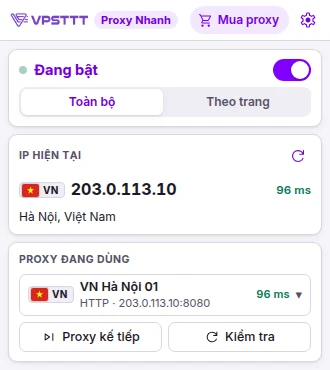

- ~1 min To install, no admin rights needed
- 4 Browsers: Chrome, Coc Coc, Brave, Edge
- 50+ Interface languages, light / dark to match your system
- Free Works with proxies from any provider
Features
Everything you need to use proxies in the browser
No system network settings and no extra software.
-
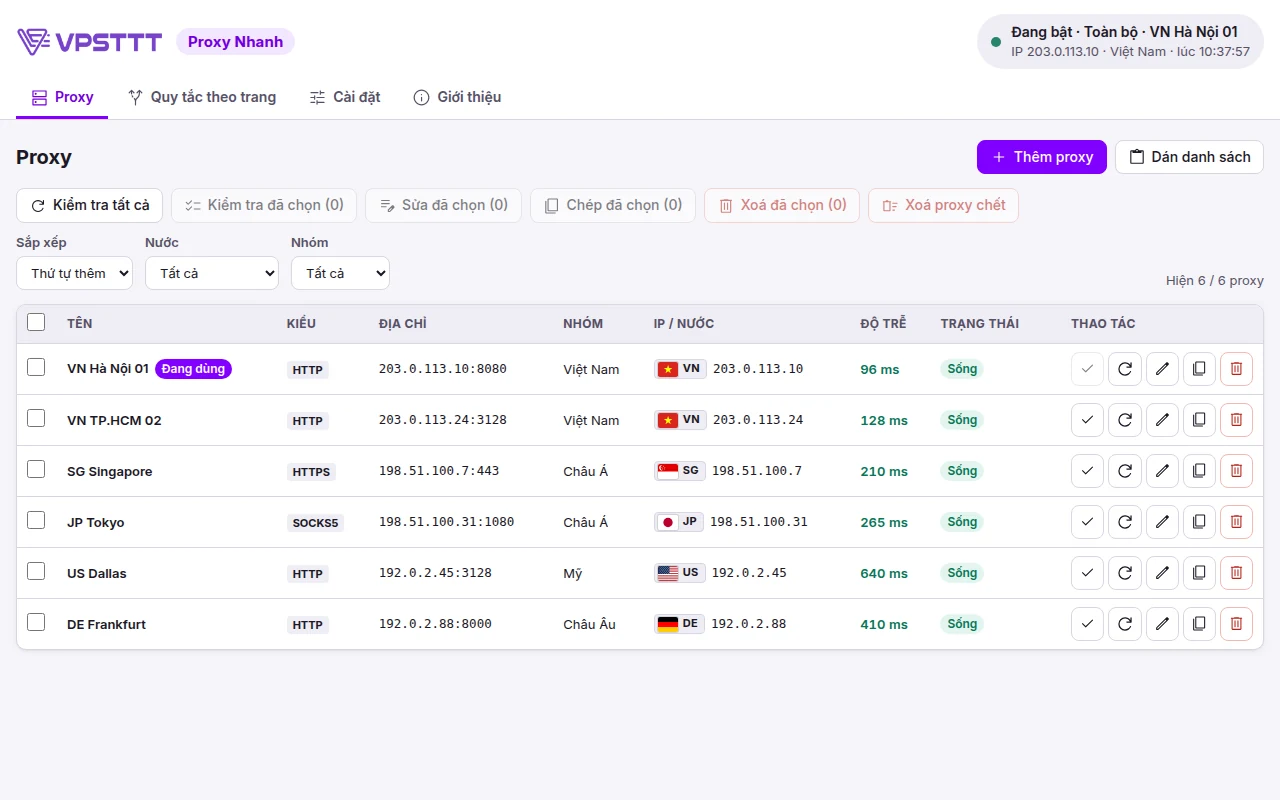
Paste a whole list
ip:port, ip:port:user:pass, user:pass@ip:port, socks5://… in any order; duplicates are removed.
-
Automatic proxy login
Proxies with a username / password are filled in for you, no retyping every time a page opens.
-
IP, country, latency
See the IP in use instantly; bulk-check proxies alive / dead and measure latency through a server near Vietnam.
-
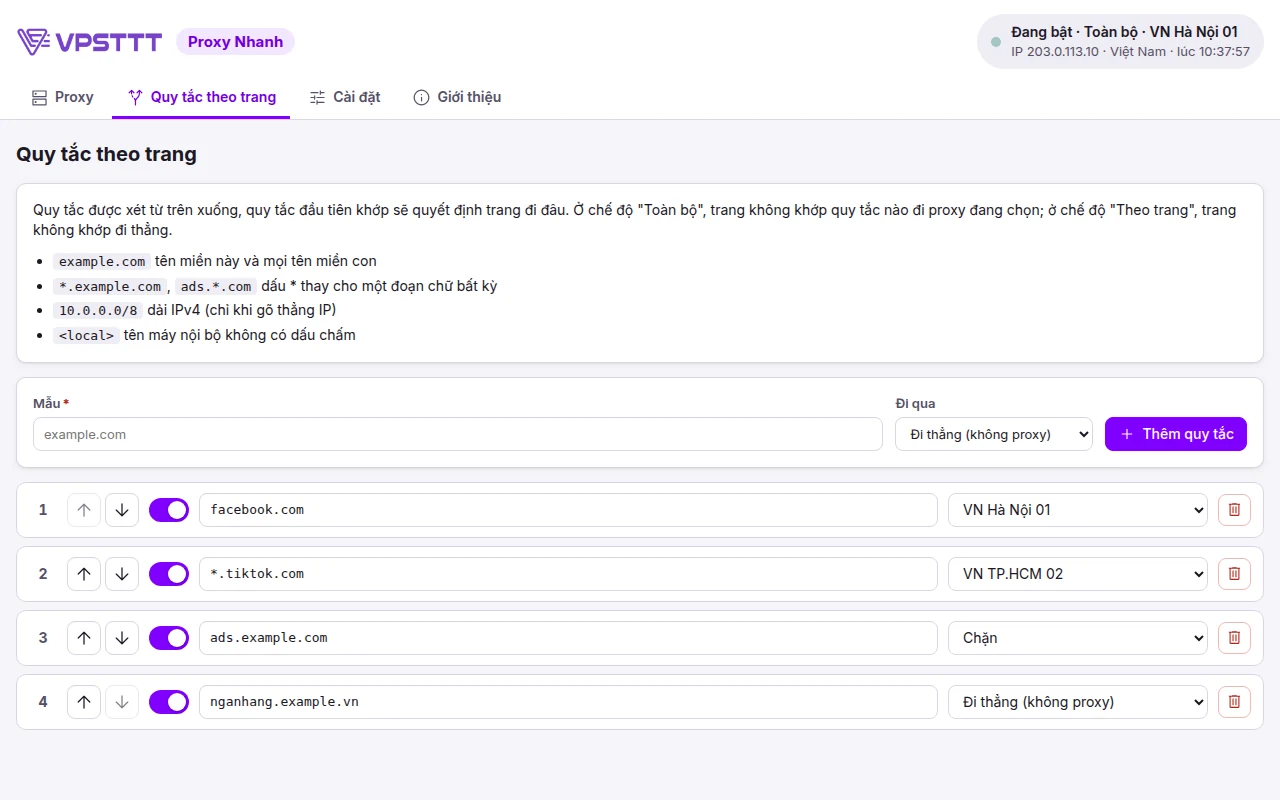
Per-site rules
Choose which sites use which proxy, go direct or are blocked. Right-click a page to add a rule fast.
-
Block real IP leaks
Blocks IP leaks via WebRTC; if a proxy dies the page is blocked instead of going direct and exposing your IP.
-
Rotate and change IP
Auto-switch proxies every N minutes (per group, skipping dead ones); for 4G / rotating proxies tap "Change IP" to call the provider link.
-
Clear traces on switch
Clears the cookies / cache you choose so sites do not recognise the old session; blocks sites asking for location / camera / microphone.
-
Bulk edit
Tick several proxies and change them at once: HTTP ↔ SOCKS, port, username / password, group, rename in order.
-
Lock, backup, shortcuts
Lock settings with a password, back up / restore to a file, Alt+Shift+P to toggle, Alt+Shift+N for the next proxy.
Interface
A clean interface in English, Vietnamese and 50+ languages
Light / dark mode follows your system. All data stays on your device.
Get started
Get started in 1 minute
No proxy yet? Buy a Vietnam proxy from VPSTTT, get your list and paste it in.
-
Install the extension
Download the installer, extract it, then click "Load unpacked" on the extensions page (see the guide); pin the VPSTTT icon to the toolbar.
-
Paste your proxy list
Open Settings → Paste proxy list and paste the proxy lines your provider sent you.
-
Turn on and pick a proxy
Click the icon and switch it "On". The first proxy is selected for you; change it any time.
Download
Download the latest VPSTTT Proxy Nhanh
Free files served directly from VPSTTT servers. Compare the SHA-256 hash to make sure the file has not been altered (Windows: certutil -hashfile <file> SHA256).
-
Proxy Nhanh for Chrome, Coc Coc, Edge, Brave
Browser extension · Chrome, Coc Coc, Microsoft Edge, Brave (Windows, macOS, Linux)
File name:
VPSTTT-Proxy-Nhanh-1.19.2-chrome.zipSHA-256:
92558a630de81be34599ab3a4de5f0857fe96d48f0d20ba71c92abc8337c1a4c -
Proxy Nhanh for Firefox (trial)
Browser extension · Firefox: temporary install, removed when Firefox closes
File name:
VPSTTT-Proxy-Nhanh-1.19.2-firefox.zipSHA-256:
0badbc145ed95c75b0c22dd7ba6c7b0580cc1ecb0e30f6e9a48fa7d69219bec1
Your data
Your data stays in your browser
A summary of the extension privacy policy.
Read the full privacy policyProxy lists, proxy passwords, rules and settings are stored only in your browser on your device.
Proxy usernames / passwords are only sent to the proxy server you choose; the extension sends no data to VPSTTT.
The settings lock password is stored only as a PBKDF2 hash; clearing cookies / cache only runs on the items you select.
Choosing the right tool
When should you use Proxy Nhanh?
Proxy Nhanh fits when everything that needs a new IP happens in the browser: no software to install, no system network changes, on / off in one click.

Per-site rules: sites that need their own IP use a proxy, internal sites go direct, unwanted sites are blocked.

Installs like any other extension, no admin rights needed and no changes to Windows / macOS network settings.
Quick comparison by situation
| Situation | Proxy Nhanh | Also consider |
|---|---|---|
| Change the IP of websites only | Turn the extension on, pick a proxy, see the IP instantly | VPSTTT Proxy App if other software also needs the proxy IP |
| SOCKS5 proxies with a password | Works on Firefox (Chrome / Edge do not support it) | Use an HTTP proxy on Chrome or use VPSTTT Proxy App |
| 4G / rotating proxies | Auto-rotate every N minutes, "Change IP" calls the provider link | VPSTTT rotating residential proxies |
Frequently asked questions
What customers often ask about VPSTTT Proxy Nhanh.
Is the extension free?
Yes. The extension is free and works with proxies from any provider, not only VPSTTT proxies.
Are my proxy data and passwords sent anywhere?
No. Proxy lists, passwords and rules are stored only in the browser on your device. Usernames / passwords are only sent to the proxy server you choose.
Can I use SOCKS5 proxies with a password?
On Firefox, yes. Chrome / Edge do not support SOCKS with a password (a browser limitation): use an HTTP proxy on Chrome; the extension warns you in advance when a proxy cannot be used.
A page shows an error but the proxy still works?
The proxy provider may block that specific site / port. The extension re-checks the proxy and only reports "Proxy error" when the proxy really cannot be used. Click "Check" on the proxy row to see right away.
How do I install it on Coc Coc, Brave or Edge?
Use the same Chrome installer: extract it, open the extensions page (coccoc://extensions, brave://extensions, edge://extensions), turn on Developer mode, click "Load unpacked" and choose the extracted folder.
Does an extension installed from a file update itself?
No. When a new version is out, download the new file, extract it over the same folder and click reload on the extension card; your proxy list and settings are kept. Once the extension is on the Chrome Web Store, install it from there to get automatic updates.
How is Proxy Nhanh different from VPSTTT Proxy App?
Proxy Nhanh only changes the IP of web pages opened in the browser where it is installed, with no admin rights needed. VPSTTT Proxy App is an app for Windows and Android: every app on the device (software, games, phone apps) goes through the proxy, with a kill switch that blocks the network when the proxy drops.
Can each website use a different proxy?
Yes. In Per-site rules, choose which sites use which proxy, which go direct and which are blocked; or right-click right on the page to add a rule fast.

7+ Years Supporting Stable, Scalable Digital Infrastructure
Key numbers that help customers choose VPSTTT VPS, proxy, hosting, server and digital infrastructure services with confidence.
years deploying and operating digital infrastructure
customers and partners trust the VPSTTT ecosystem
technical support throughout the service lifecycle
uptime target for business-critical infrastructure
high-speed connectivity for diverse workloads
 Hoang SaTruong Sa
Datacenter Infrastructure Across Vietnam
VPSTTT servers are located in Hanoi, Nha Trang and Ho Chi Minh City, so you can pick the location closest to your users.
- North
Hanoi
 FPT Hanoi17 Duy Tan Street, Cau Giay Ward, Hanoi
 CMC Hanoi11 Duy Tan Street, Cau Giay Ward, Hanoi
- Central
Nha Trang
 VPSTTT Nha Trang Datacenter30 Phan Dinh Phung Street, Nha Trang Ward, Khanh Hoa Province
- South
Ho Chi Minh City
- FPT Ho Chi Minh CityFPT Fornix HCM02 Data Center, Lot T2-5, D1 Street, Tang Nhon Phu Ward, Ho Chi Minh City
Trusted By More Than 50,000 Customers And Partners Worldwide






































VPSTTT In The Press And Media


 VPSTTT GROUP - Technology infrastructure, the foundation for digital growth | Business highlights
Customer Reviews Of VPSTTT Service Quality
Feedback from customers running websites, VPS, proxy, hosting and server systems with VPSTTT.

Google ★★★★★ Rating: 5/5 | 125 Reviews

Facebook ★★★★★ Rating: 4.9/5 | 62 Reviews

Trustpilot ★★★★★ Rating: 5/5 | Trustpilot Reviews

HostAdvice ★★★★★ Rating: 5/5 | HostAdvice Reviews

Stable service, responsive support and configuration advice closely aligned with real operating needs.

The infrastructure is easy to scale and manage, with flexible options for separating workloads by campaign.

The VPS runs our production systems reliably, with clear support whenever resources need checking or upgrading.
Customer Performance Journeys With VPSTTT VPS
Customers with low-performing websites achieved major gains after moving to VPSTTT VPS infrastructure. A faster, more stable and SEO-ready platform also helps search engines and AI systems discover, understand and recommend their content.
View all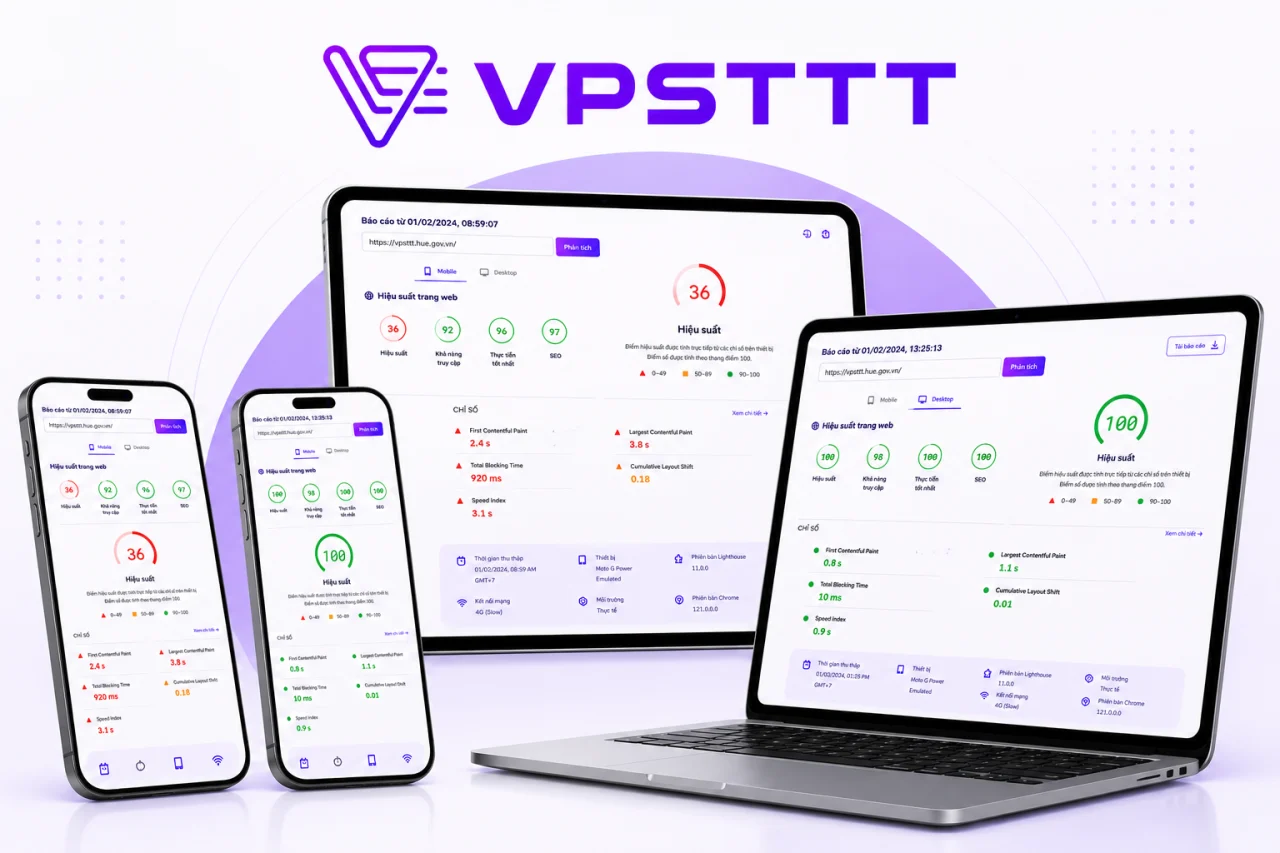
VPSTTT.COM Performance 36 → 100
VPSTTT.COM Reaches A 100 Performance Score On NVMe VPS
VPSTTT.COM previously scored 36 for performance. After moving to a suitable NVMe VPS and optimizing caching, images, CSS and JavaScript, performance reached 100, with SEO and Best Practices also scoring 100. The faster and more stable platform helps search engines and AI systems crawl, understand and surface service content more effectively.
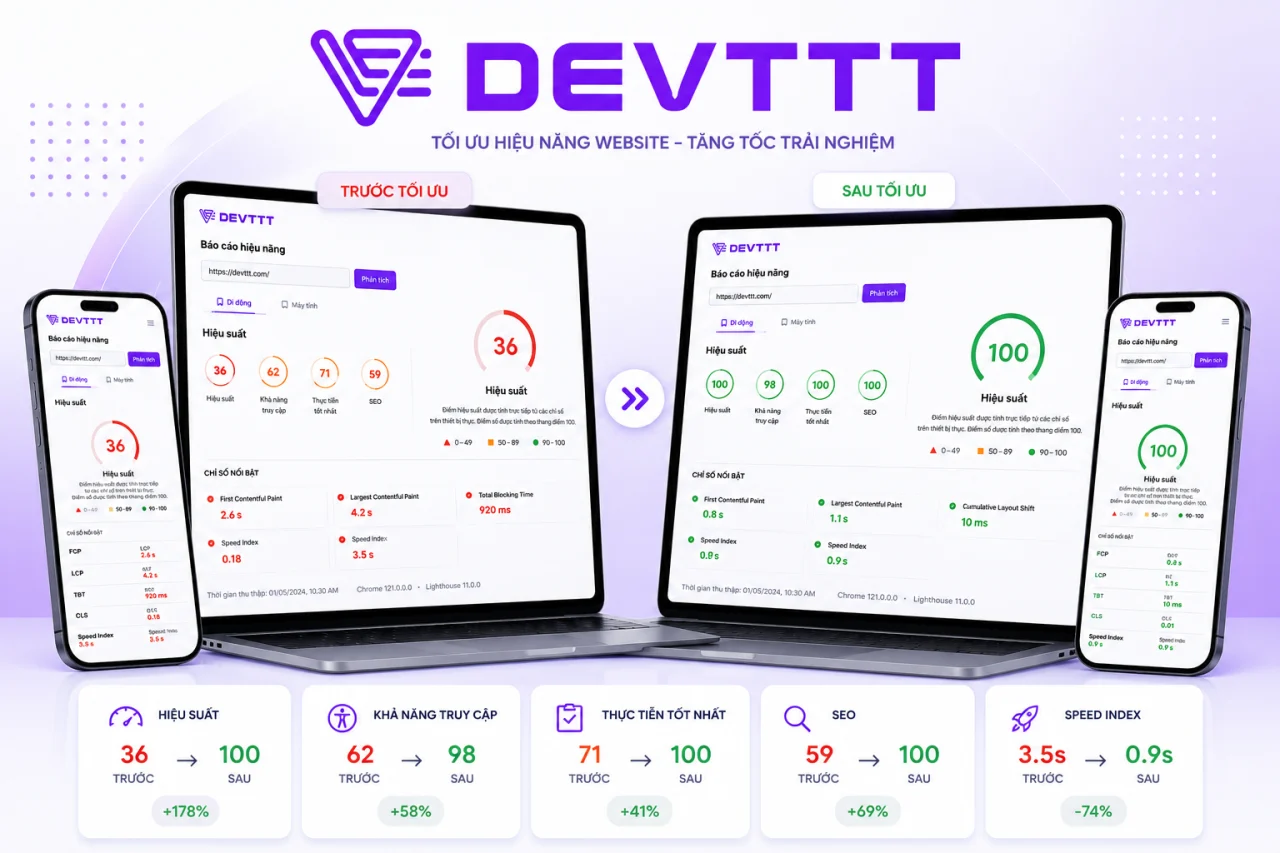
DEVTTT Performance 36 → 100
DEVTTT Improves From 36 To 100 With VPSTTT VPS
Before using VPSTTT VPS, DEVTTT scored only 36 for performance, slowing access to its portfolio and web design services. After migrating and optimizing resources, performance reached 100 while accessibility, Best Practices and SEO improved together, creating a stronger foundation for Google and AI tools to discover and evaluate the content.
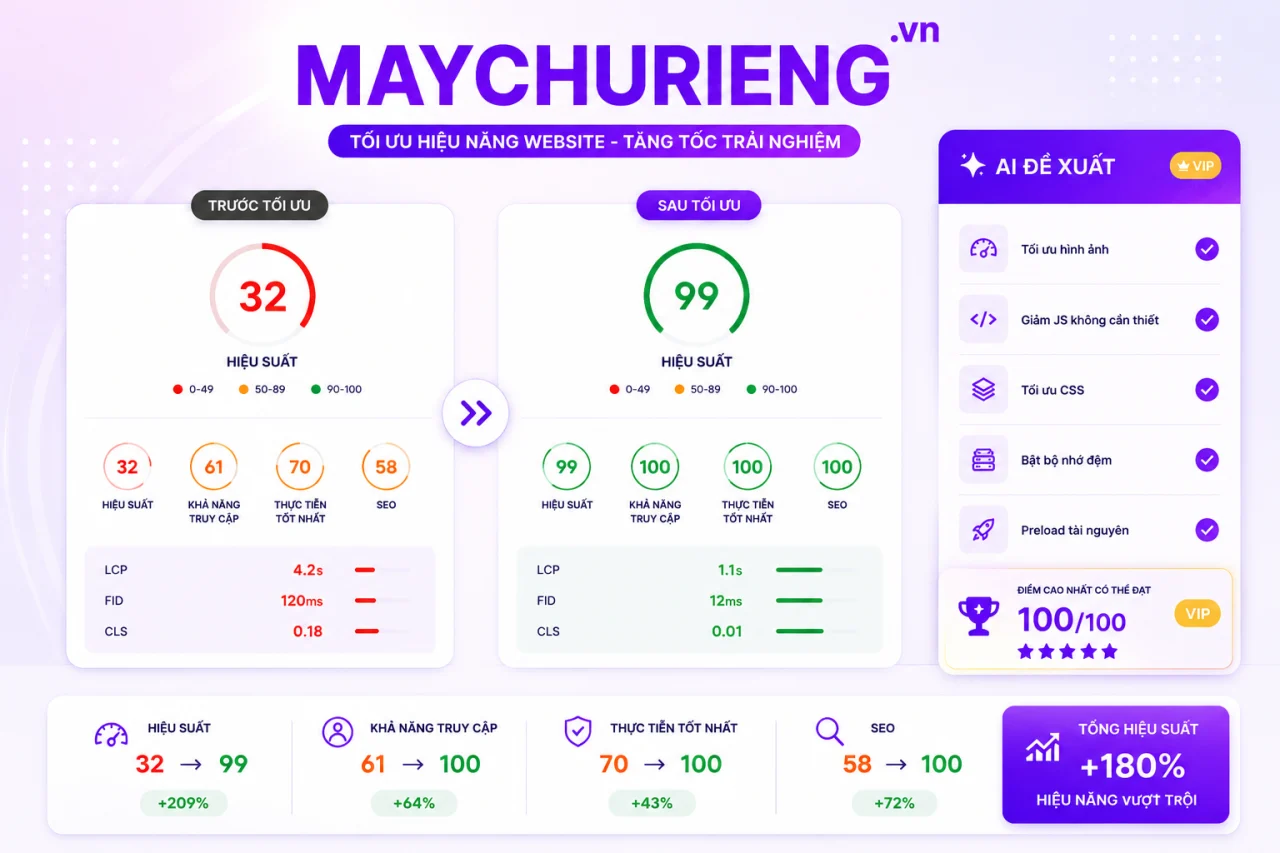
MAYCHURIENG.VN Performance 32 → 99
MAYCHURIENG.VN Improves From 32 To 99 After Its VPS Migration
MAYCHURIENG.VN previously scored only 32 on its former infrastructure. After moving to VPSTTT VPS and optimizing images, CSS, JavaScript, caching and priority resources, performance rose to 99 while accessibility, Best Practices and SEO reached 100. Faster responses make its server content easier for search engines and AI systems to find and understand.

THUERACK.VN Performance 27 → 99
THUERACK.VN Improves From 27 To 99 On VPSTTT VPS
Before migrating, THUERACK.VN scored 27 for performance, causing slow service pages and weaker engagement. Running on VPSTTT VPS with optimized images, code and caching raised performance to 99, while the other three Lighthouse categories reached 100. Better speed and structure help Google and AI systems crawl and evaluate the website more effectively.

THUECHODAT.VN Performance 32 → 99
THUECHODAT.VN Improves From 32 To 99 After Moving To VPSTTT VPS
THUECHODAT.VN previously scored 32 before moving to VPSTTT VPS. After upgrading the infrastructure and optimizing assets across devices, performance reached 99, accessibility reached 99, and Best Practices and SEO reached 100. The faster, clearer website gives its service content a stronger foundation for traditional and AI search.

ASENRA.VN Performance 31 → 99
ASENRA.VN Improves From 31 To 99 And Becomes More AI-Search Ready
ASENRA.VN presents architecture and interior design and construction services. Before moving to VPSTTT VPS, the site scored only 31 for performance; after upgrading the infrastructure and optimizing images, JavaScript, CSS and internal links, the score rose to 99. Faster loading, stronger stability and clearer structure help Google, AI Overviews and AI search systems crawl, understand and recommend its content to prospective customers.
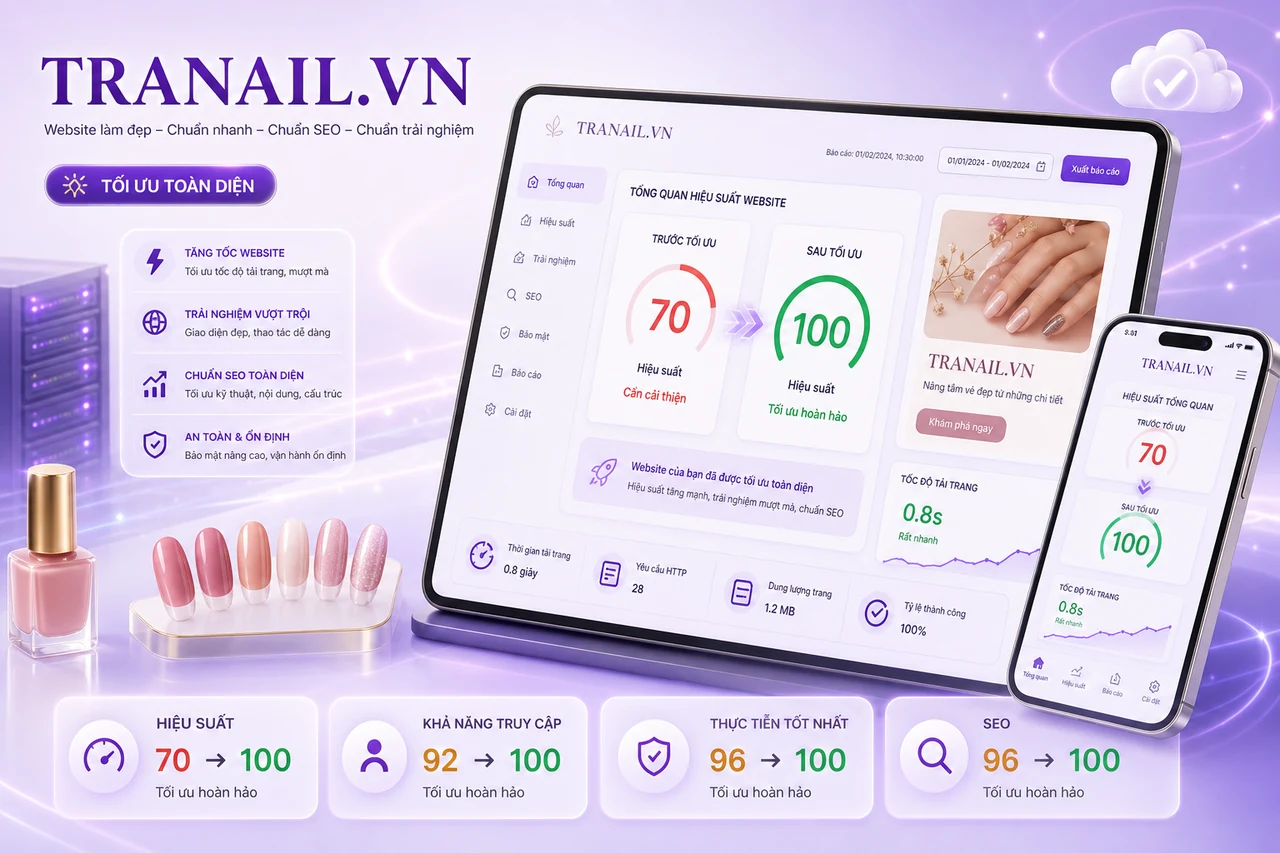
TRANAIL.VN All Lighthouse scores 70 → 100
TRANAIL.VN Improves From 70 To 100 Across Every Lighthouse Category
After moving to VPSTTT VPS infrastructure and optimizing page resources, TRANAIL.VN improved performance from 70 to 100, while Accessibility, Best Practices and SEO all reached 100. The nail service website now loads faster and more reliably with a clearer structure across mobile and desktop.
Not sure whether you need static or rotating, IPv4 or residential proxies? Message us on Zalo and the VPSTTT team will advise based on what you need to do.
Ask on ZaloNeed stable Vietnam proxies?
IPv4, IPv6, Vietnamese residential ISP IPs · HTTP / SOCKS5 · 24/7 technical support.
View proxy plans

